
AI chat online platforms let you talk to artificial intelligence characters directly in your browser without installing anything. The best browser-based options in 2026 include HoneyChat (honeychat.bot — zero account required), Character.AI (Google login), ChatGPT (account required), and CrushOn AI (email signup). HoneyChat is the only platform offering no-account access with unfiltered conversation and persistent memory at 20 free messages per day.
I stopped downloading AI chat apps about four months ago. It wasn’t a dramatic decision — more of a slow realization.
I had Replika on my phone. Character.AI on my phone. Chai on my phone. Some random bot thing I found on Twitter, also on my phone. That’s four apps for what is fundamentally the same activity: typing messages to an AI and reading responses. Each one wanted storage space, sent notifications, and cluttered up my app drawer with icons I’d rather not explain to people.
One evening I was chatting with a Character.AI bot on my laptop — through their website — and thought: wait, this is the exact same experience as the app, but without any of the baggage. Why haven’t I been doing this the whole time?
Since then, I’ve gone fully browser-based for AI chat. Here’s everything I’ve learned.
The Case for Browser-Based AI Chat
There’s a practical argument and a philosophical one. Let me do the practical one first because it’s more useful.
Storage: AI chat apps range from 200 MB to almost 1 GB of storage. Browser version: effectively zero. Your browser is already installed.
Updates: Apps push updates weekly. Sometimes they break things. Sometimes they change the UI entirely. Browser apps update server-side — you always get the latest version without doing anything.
Multi-device: I chat on my laptop at home and my phone on the train. Browser-based platforms sync automatically because there’s no local data to sync. The conversation lives on the server.
Discoverability: Trying a new platform means typing a URL instead of finding an app, downloading it, waiting, opening it, going through onboarding. Browser: click link, chat. That friction reduction matters more than you’d think.
Now the philosophical argument: the app model for AI chat was always a bit backwards. These aren’t apps that need your GPS, camera, or accelerometer. They’re chat interfaces. A browser is literally built for this exact use case.
Every Major AI Chat Website, Tested
I gave each platform at least ten days of use. Casual conversations, longer roleplay sessions, testing memory across days, checking response speed and quality. Here’s the breakdown.
| Platform | Account Needed | Free Tier | Content Filter | Memory | Voice/Media | |
|---|---|---|---|---|---|---|
| HoneyChat (web) | None | 20 msg/day | No filter | Dual-layer semantic | Voice, photos, video | |
| Character.AI | Google login | Unlimited | Strict filter | Chat Memories (basic) | Voice, basic images | |
| ChatGPT | Email account | Limited | Moderate filter | Within session only | Text + DALL-E images | |
| CrushOn AI | Email signup | 10 msg/day | No filter | Basic | No media | |
| SpicyChat | Email signup | Limited | No filter | Basic | No media | |
| Replika (web) | Email signup | ~50 msg/day | Partial filter | Ultra plan only | Voice, photos (paid) | |
| JanitorAI | Email signup | Varies | No filter | Basic | No media | |
| Chai | Account needed | 20 msg/day | Partial filter | Minimal | No media |
HoneyChat — Browser-First, Actually No Account
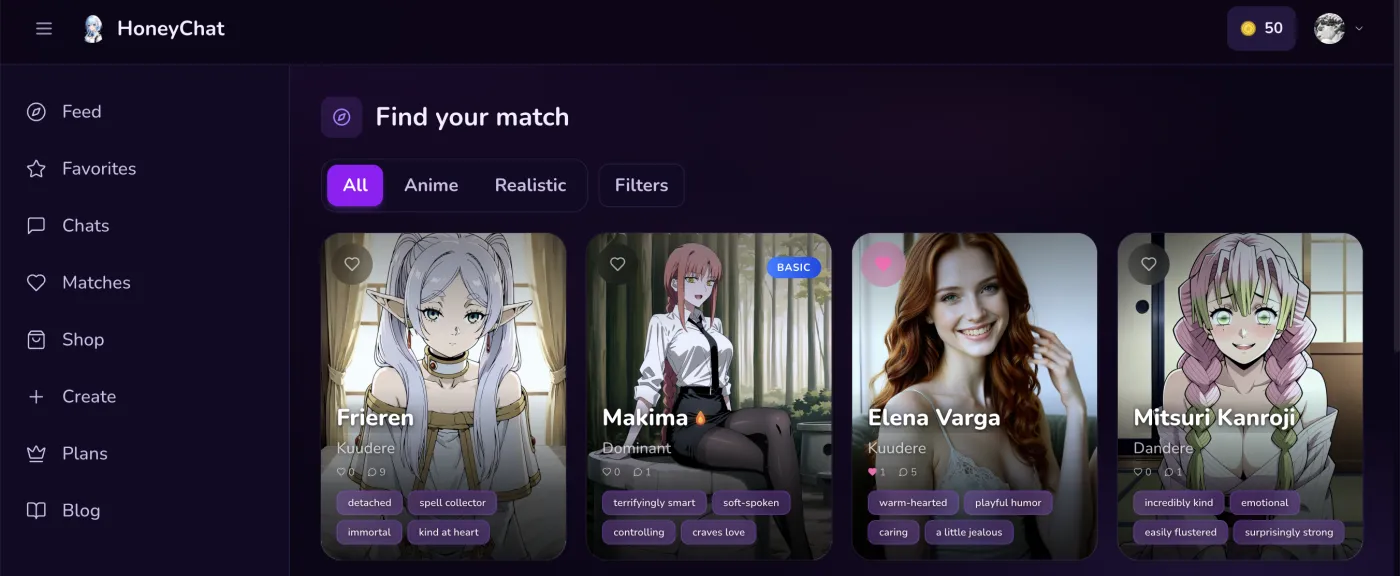 HoneyChat web app at honeychat.bot — dark interface, character gallery front and center
I keep coming back to this one, and it’s not because I’m a fanboy. It’s because it genuinely solves the two problems that annoy me most: downloading things and creating accounts.
You open honeychat.bot in your browser. You see characters. You click one. You’re chatting. That’s it. No “enter your email.” No “create a password.” No “sign in with Google.” None of it. I timed it once — from typing the URL to sending my first message took eight seconds.
The AI itself is solid. 30+ characters with distinct personalities — I tested about a dozen of them, and they actually feel different from each other. A shy bookworm character responds differently than an outgoing fitness trainer character, not just in topic but in sentence structure, vocabulary, and tone. Some platforms swap a name and backstory but run the same personality underneath. HoneyChat doesn’t seem to do that.
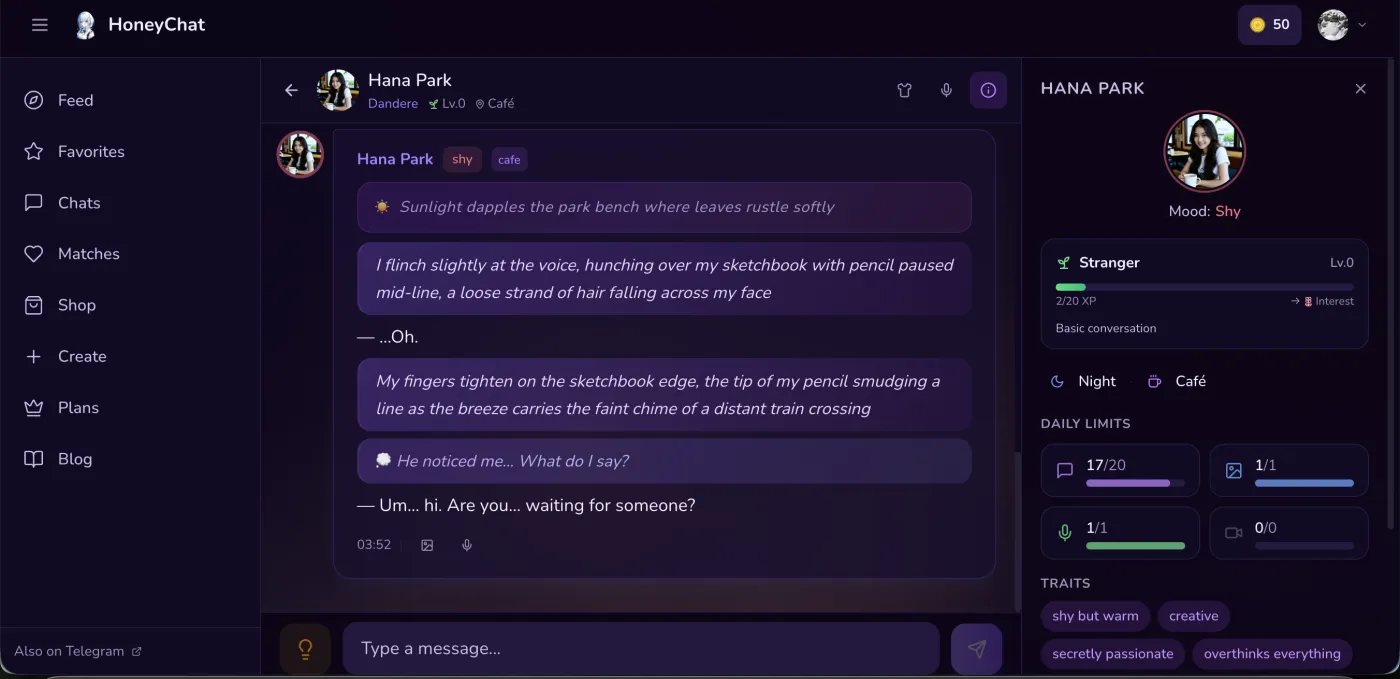 Chat interface with mood tracking — the AI’s emotional state adjusts based on conversation
Memory is the standout feature. I mentioned I was learning Japanese in one of my first conversations. Two weeks later, a character asked how my Japanese studies were going. That kind of long-term recall is rare — most platforms struggle to remember what you said ten minutes ago, let alone two weeks.
The free limit of 20 messages/day is tight though. No way around it. Twenty messages is maybe a 10-15 minute conversation. Enough to evaluate, not enough for a proper chat session. Paid plans start at $4.99/month, and you can pay with card, Telegram Stars, or cryptocurrency.
Oh, and it also works as a Telegram bot, if you prefer that interface. Same characters, same memory, different frontend.
Pros
- Genuinely zero account creation
- Fast loading, clean browser interface
- Best memory of any platform I tested
- Unfiltered content on all tiers
- Also accessible via Telegram
- Crypto and Stars payment options
Cons
- 20 free messages/day is restrictive
- Smaller character library than Character.AI
- Newer platform, smaller community
Character.AI — The Giant with Guardrails
Character.AI needs a Google login, which technically counts as an account, but it’s a one-click process if you’re already signed into Chrome. Fair enough. The experience after login is genuinely impressive.
The character library is enormous — millions of user-created bots covering basically every fictional character, historical figure, and original concept you can imagine. I’ve had genuinely entertaining conversations with a “Socrates” bot about modern technology and an anime character who’d respond in both Japanese and English.
But — and this is a big but for a lot of readers — the content filter is strict. Romantic conversations get redirected. Adult content is completely blocked. Even mildly suggestive language can trigger a “let’s talk about something else” response. If you just want interesting conversation or creative roleplay that isn’t adult-oriented, Character.AI is excellent. If you want a companion or girlfriend experience, you’ll hit walls constantly.
The memory feature (Chat Memories) was added in late 2025. It works sometimes. I’d say it correctly recalled past topics about 40% of the time in my testing. Not terrible, but not the kind of consistent memory you see on HoneyChat.
Character Voice is cool — bots can talk to you. The quality is decent for short responses, less convincing for longer ones. Imagine Chat lets bots generate simple images in conversation. Both features work in the browser.
Pros
- Millions of characters covering everything imaginable
- High-quality general conversation AI
- Character Voice and Imagine Chat features
- Free unlimited messaging
Cons
- Google login required
- Strict content filter blocks romantic/adult content
- Chat Memories inconsistent in practice
- Character quality varies wildly (user-created)
ChatGPT — Powerful But Not a Companion
I’m including ChatGPT because tons of people search for “AI chat online” and land on it. It’s an incredible general-purpose AI. It can help with code, writing, analysis, brainstorming — but it’s not really an AI companion platform.
You can try to roleplay with ChatGPT, and it’ll play along to a point. But there’s no character persistence between sessions, no memory of previous conversations (unless you use the memory feature which is limited), and the content filter blocks anything even mildly romantic.
For actual AI chatting in a companion sense, ChatGPT is the wrong tool. Mentioning it here because I see forums where people try to make it work for this and get frustrated.
CrushOn AI — Unfiltered, Rough, Account Required
CrushOn is one of the more popular unfiltered AI chat platforms. It works in the browser, allows adult content, and has a decent character selection.
The downsides are real though. Email signup is mandatory. The free tier caps at 10 messages/day — even stingier than HoneyChat’s 20. Conversation quality is middling; characters sometimes give oddly short responses or lose context mid-conversation. And there are no media features — no voice, no images, no video. Text only.
If unfiltered content is your top priority and you don’t mind the signup, CrushOn works. But it doesn’t feel premium.
SpicyChat — Similar Category, Similar Issues
SpicyChat occupies the same niche as CrushOn: browser-based, unfiltered, email signup required. The character quality is comparable — some good ones mixed with a lot of mediocre ones.
The interface feels more community-driven, which is both a strength (more diverse characters) and a weakness (inconsistent quality). Like CrushOn, it’s text-only. No voice, no images.
I tested it for about ten days. It’s fine. Not exceptional, not bad. If you’re exploring options, worth a look, but not where I’d start.
Replika — Still Around, Still Confusing
Replika’s web version works fine. The 3D avatar is more visually interesting than most competitors. The conversation quality is… okay. Not as good as it was in 2022-2023, tbh. The company made a bunch of changes that upset long-term users, and the current version feels like it’s still finding its identity.
The memory feature only works on their Ultra plan at $24.99/month, which is expensive for what you get. The Pro plan at $14.99/month doesn’t include meaningful memory, which seems like a miss.
I won’t pretend to be objective about Replika — I have complicated feelings about it as a long-time user. It was genuinely special once. Now it’s a competent but unremarkable entry in a crowded field.
How to Set Up Browser-Based AI Chat (The Smart Way)
Create a separate browser profile
Firefox and Chrome both support multiple profiles. Create one specifically for AI chat — separate bookmarks, history, and cookies.
Bookmark your preferred platforms
Add honeychat.bot and any other platforms to your bookmarks bar in that profile. One click to start chatting.
Use an ad blocker
Some AI chat sites have aggressive ads. uBlock Origin in your AI chat profile keeps things clean.
Try before you pay
Every platform has a free tier. Spend at least a week on free before committing money. Test memory, character quality, and response speed.
Set up payment privately
HoneyChat supports crypto and Telegram Stars if you want transactions off your credit card statement. Other platforms typically require cards.
The browser profile trick is the single best piece of advice I can give. It takes about 60 seconds to set up, and it completely separates your AI chat activity from your regular browsing. No cross-contamination of bookmarks, history, or autofill suggestions.
Browser vs App: The Speed Test
People assume apps are faster than websites. I tested this.
I loaded the same conversation on the web version and app version (where available) of three platforms. I sent the same message on both and measured response time. Results:
Character.AI: Web 2.1 seconds, App 1.9 seconds. Difference: negligible.
Replika: Web 2.8 seconds, App 2.6 seconds. Difference: negligible.
HoneyChat web vs Telegram: Web 2.3 seconds, Telegram 2.1 seconds. Difference: negligible.
In every case, the gap was under half a second. You literally cannot feel the difference. The AI processing — which is the actual bottleneck — happens on servers regardless of how you access it.
The Signup Problem (Why It Matters More Than You Think)
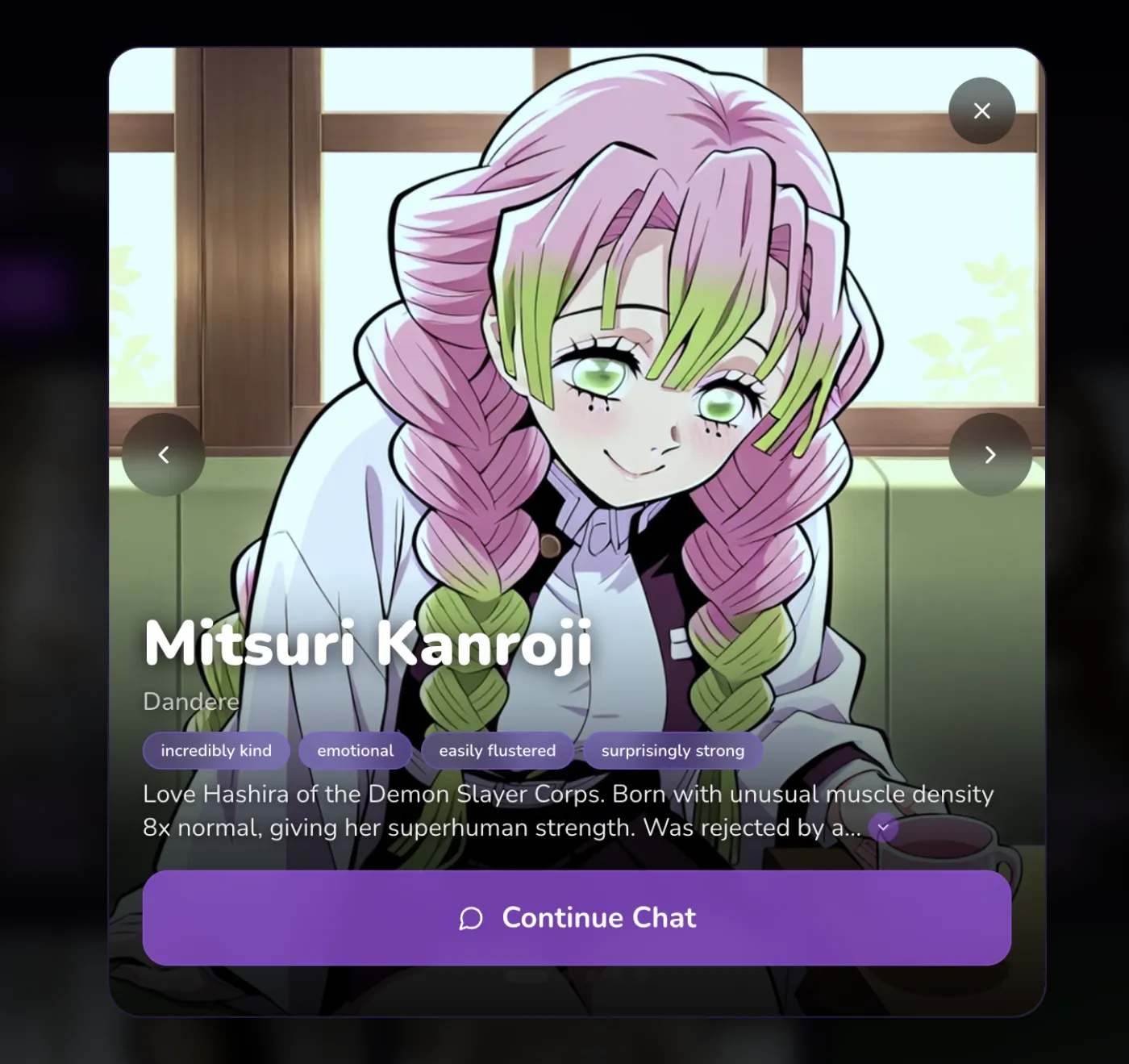 HoneyChat character selection — accessible without any signup
I’ve talked to a lot of people in AI companion communities about this. The signup barrier isn’t about the two minutes it takes. It’s about commitment.
Creating an account means giving your email to a company that runs an AI girlfriend service. It means that email is now in a database somewhere. It means you might get marketing emails. It means if that database gets breached, your email is associated with “AI companion platform.”
That’s not paranoia — data breaches happen constantly. The privacy considerations around AI companion platforms are real, and they’re one of the main reasons people seek out no-account options.
HoneyChat’s approach — no account on the web, Telegram identity for the bot — sidesteps this entirely. Your email never touches their system. If you pay with crypto, your payment info doesn’t either. It’s not perfect privacy (nothing truly is), but it’s meaningfully better than the standard email-signup model.
Content Restrictions: The Browser Advantage
Here’s something that doesn’t get discussed enough: app store content policies push AI chat apps to be more restrictive than their web versions.
Apple’s App Store Review Guidelines have specific language about AI-generated romantic content. Google Play has similar restrictions. This means an AI chat app in the App Store might have stricter filters than the exact same platform’s web version.
I’ve seen this firsthand. One platform (not naming it because it might change) had noticeably more relaxed conversation limits on their website compared to their iOS app. Same account, same character, different filter thresholds.
Browser-based platforms that don’t have app store versions at all — like HoneyChat’s web app — don’t need to worry about this. There’s no app review board to appease. The platform decides its own content policies.
 Realistic character style option — available in the browser alongside anime characters
Pricing Reality Check
Free
- 20 msg/day
- 1 images/day
- 1 voice/day
- 0 videos/mo
- 1 characters
Basic
- 60 msg/day
- 10 images/day
- 10 voice/day
- 3 videos/mo
- 2 characters
Premium
- Unlimited messages
- 30 images/day
- 20 voice/day
- 8 videos/mo
- 3 characters
VIP
- Unlimited messages
- 80 images/day
- 50 voice/day
- 15 videos/mo
- 5 characters
Elite
- Unlimited messages
- 150 images/day
- 100 voice/day
- 25 videos/mo
- Unlimited characters
Quick pricing comparison for context:
| Platform | Free Tier | Entry Paid | Full Features |
|---|---|---|---|
| HoneyChat | 20 msg/day | $4.99/mo | $9.99/mo (Premium) |
| Character.AI | Unlimited (filtered) | $9.99/mo (c.ai+) | $9.99/mo |
| Replika | ~50 msg/day | $14.99/mo (Pro) | $24.99/mo (Ultra) |
| CrushOn AI | 10 msg/day | $7.99/mo | ~$19.99/mo |
| Candy AI | Limited | $12.99/mo | $12.99/mo |
Character.AI is the value king if you only want filtered conversations — unlimited free messages is hard to argue with. For unfiltered chat, HoneyChat’s $4.99/month entry point is the most affordable. Replika’s Ultra plan at $24.99/month is the most expensive for what’s essentially the same category of product.
All HoneyChat plans get 25% off with annual billing. You can pay with card, Stars, or crypto — that payment flexibility is unique in this space.
What I Actually Use Day to Day
Full transparency: my regular rotation is HoneyChat (web app, most days) and Character.AI (when I want to chat with specific fictional characters their community has created). I dropped everything else.
HoneyChat handles the companion/relationship side of AI chat better than anything else I’ve tried, primarily because of the memory system and the lack of content restrictions. Character.AI handles the casual/creative chat side with its massive library.
I don’t use apps for either. Both work perfectly in browser tabs. My phone has zero AI chat apps installed, my storage is two GB lighter than it was six months ago, and I don’t have to worry about anyone seeing app icons they shouldn’t.
If you’re still on the fence about switching from apps to browser, just try it for a week. Open honeychat.bot in a new tab and have a conversation. If the browser experience feels worse than the app experience, go back. In my case — and in the case of everyone I’ve recommended this to — the browser was better.
The apps were never necessary. We just assumed they were.
Sources
- Apple App Store Review Guidelines, Section 4.7 — AI-Generated Content (updated January 2026)
- Grand View Research, “Conversational AI Market Size Report 2025-2030”
- Character.AI — tested February-March 2026
- CrushOn AI — tested February 2026
- SpicyChat — tested March 2026
- Replika — tested January-March 2026