
Telegram AI bots are server-side applications that receive messages through Telegram’s Bot API, process them using large language models (LLMs), and return generated text, images, voice, or video through the same API. HoneyChat is a production example that combines LLM chat, vector memory, image generation, and voice synthesis — all running behind a single Telegram bot interface.
I’ve been building and tearing apart software for fifteen years. When I first started using AI companion bots on Telegram, I found myself doing what I always do — opening developer tools, tracing network requests, reading documentation, trying to figure out how the thing actually works under the hood.
What I found surprised me. These aren’t simple chatbots running on pattern matching. The architecture behind a modern Telegram AI bot is genuinely complex — multiple services, async job queues, vector databases, GPU inference pipelines, and payment processing, all coordinated behind what looks like a simple chat interface.
This article is the technical explainer I wished existed when I started digging. If you’ve ever wondered what happens between you pressing “Send” and getting a response from an AI character — this is it.
The big picture: what’s running behind the scenes
Let’s start with an overview. A modern AI companion bot isn’t a single program. It’s a distributed system with multiple services, each handling a specific concern.
Here’s what a production-grade Telegram AI bot typically looks like:
Core Services Architecture
Bot Service (Dispatcher)
The entry point. Receives messages from Telegram via webhooks or long polling. Handles routing, middleware (auth, rate limiting, plan checks), and dispatches to the appropriate handler. Usually built with aiogram (Python) or grammY (TypeScript).
LLM Inference
The 'brain.' Constructs prompts from character personality, conversation history, and retrieved memories. Sends to an LLM provider (OpenRouter, OpenAI, self-hosted). Manages model selection per user tier, token budgets, and retry logic.
Image Generation Pipeline
Translates chat context into image prompts. Routes to GPU infrastructure (ComfyUI, Automatic1111) or cloud APIs (Flux, DALL-E). Handles character-specific LoRA models, resolution scaling, and post-processing.
Voice Synthesis
Text-to-speech engine that converts bot responses into voice messages. Runs on CPU or GPU depending on model. Returns native Telegram voice messages (.ogg format).
Data Layer
PostgreSQL for persistent data (users, subscriptions, characters). Redis for cache, session state, rate counters, and short-term memory. ChromaDB (or similar) for vector embeddings used in long-term semantic memory.
Task Queue
Celery or similar async task processor. Handles long-running jobs (image generation, video creation, voice synthesis) without blocking the main bot thread. Separate queues for different job types with independent scaling.
This isn’t theoretical — it’s what actually runs behind bots like HoneyChat. The key insight is that what feels like a single conversation is actually touching five or more separate services on every message.
Message lifecycle: from tap to response
Let me walk through exactly what happens when you send a message to an AI bot on Telegram. Every step, in order.
Lifecycle of a Single Message
You tap Send
Your message leaves your phone. Telegram's client encrypts it (server-client TLS) and sends it to Telegram's servers. If the bot uses webhooks, Telegram forwards the message to the bot's server via HTTPS POST. If long polling, the bot's server picks it up on its next poll cycle.
Middleware chain
The bot server receives the message and runs it through a middleware stack: authentication (is this user known?), rate limiting (has this user exceeded their daily message count?), plan injection (what tier is this user on?), and cost guard (has the daily spend limit been hit?).
Context assembly
The handler fetches conversation context: last 20 messages from Redis (short-term memory), top-K semantically relevant memories from ChromaDB (long-term memory), the character's personality prompt, and the user's plan-specific settings (model, token budget, content level).
Prompt construction
All context is assembled into a structured prompt. System prompt (character personality + rules), retrieved memories, recent conversation history, and the user's new message. Total token count is checked against the plan's context limit — if too long, older history is summarized.
LLM inference
The prompt is sent to the LLM provider. Model selection depends on user tier — free users get a smaller model, premium users get Llama 70B or 405B. The provider generates tokens one by one (streaming) or returns a complete response. API cost is logged to the database.
Post-processing
The raw LLM response is checked for content level compliance, trimmed if needed, and formatted. If the response triggers image or voice generation, async jobs are dispatched to the task queue. The text response is sent back through the Telegram Bot API.
Media generation (async)
If triggered, image generation runs on GPU (1-10 seconds depending on model and resolution). Voice synthesis converts the text response to audio (1-3 seconds). Results are sent as separate Telegram messages once ready.
The total time from send to text response is typically 3-5 seconds. Media (images, voice) arrives a few seconds after that. This is why you often see the text first, then the photo — they’re generated by different pipelines running in parallel.
The LLM layer: choosing models and managing costs
The LLM is the most expensive and most critical component. Here’s how it actually works in production.
Model routing
Not all users get the same model. This is one of the things that separates hobby bots from production ones. A tiered model routing system assigns different LLMs based on the user’s subscription:
Typical LLM Model Routing by Tier
| Free | Basic | Premium | VIP | Elite | |
|---|---|---|---|---|---|
| Model class | Small (7-8B) | Medium (70B) | Large (70B) | Large (70B+) | Flagship (405B) |
| Max output tokens | 300 | 500 | 800 | 1200 | 2000 |
| Context window | 4K | 8K | 16K | 32K | 64K |
| Response quality | Basic | Good | Very good | Excellent | Best available |
| Cost per message | $0.001 | $0.003 | $0.005 | $0.01 | $0.02 |
The cost difference is significant. A free-tier user generating 20 messages costs about $0.02. An elite user generating 200 messages costs about $4.00. At scale, model routing is the difference between profitability and bankruptcy.
Token budgets and context management
LLMs have fixed context windows — the maximum amount of text they can process at once. A typical 8K context window holds roughly 6,000 words. That sounds like a lot, but consider what needs to fit:
- System prompt (character personality): 500-1,500 tokens
- Retrieved memories: 300-800 tokens
- Recent conversation history: 2,000-4,000 tokens
- User’s new message: 100-500 tokens
- Space for the response: 300-2,000 tokens
This is why old conversations get summarized rather than included in full. A summarization step compresses 20 messages into a 200-token summary, freeing space for the model’s response while preserving key context.
Cost tracking and safety nets
Every API call is logged with its token count and cost. Production bots implement hard stops — if daily spending exceeds a threshold (say, $20), the system halts all LLM requests to prevent runaway billing. This matters because a single misconfigured prompt loop could generate hundreds of dollars in API costs in minutes.
Memory architecture: why your AI remembers (or doesn’t)
Memory is what separates a novelty chatbot from something that feels like a relationship. Here’s how it’s actually implemented.
Short-term memory (Redis)
The simplest layer. The last 20 messages are stored in Redis, a fast in-memory database. Each conversation has a key (like chat:user_123:char_456) that holds a list of recent messages. These expire after 7 days of inactivity.
This is what allows the bot to maintain coherent conversation within a session. But it’s not enough — 20 messages cover about 10 minutes of chatting. Anything older is gone.
Long-term memory (Vector database)
This is where it gets interesting. Instead of storing raw messages, the bot converts conversations into vector embeddings — mathematical representations of meaning. These embeddings are stored in a vector database like ChromaDB.
When you send a new message, the bot:
- Converts your message into an embedding
- Searches the vector database for similar past conversations
- Returns the top-K most relevant results
- Includes them in the prompt as “memories”
The key word is “relevant,” not “recent.” If you talked about your job stress three weeks ago and mention work today, the vector search will surface that old conversation — even though it’s nowhere near the last 20 messages. This is semantic memory, and it’s what creates those surprising moments where the AI seems to genuinely remember.
Short-term vs Long-term Memory
Pros
- Short-term (Redis): Fast, simple, perfect for maintaining conversation flow within a session
- Long-term (ChromaDB): Semantic search across all past conversations, no time limit, topic-based retrieval
- Combined system: Bot always has recent context plus relevant historical context
Cons
- Short-term alone: Conversations reset after 20 messages or 7 days — AI forgets everything
- Long-term alone: Without recent messages, AI loses track of the current conversation flow
- Neither: Most cheap bots — every conversation starts from zero, no continuity
Memory injection in the prompt
Here’s a simplified version of what the assembled prompt looks like:
The system prompt defines who the character is — personality, speech patterns, background. The memory block inserts retrieved conversations that the vector search deemed relevant. The recent history block provides the last few exchanges for conversational flow. And the user’s message is at the end.
The model processes this entire prompt as if it’s one continuous conversation, naturally incorporating the retrieved memories into its response. From the user’s perspective, the AI “remembers.” From an engineering perspective, it’s reconstructing the illusion of memory from retrieved data every single time.
Image generation pipeline
When an AI bot sends you an image, here’s the full pipeline.
Image Generation Pipeline
Trigger detection
The LLM's response or user request triggers image generation. This could be explicit ('send me a photo') or implicit (the bot decides to send a selfie based on conversation context).
Prompt construction
The system builds an image prompt from: character appearance tags (hair color, eye color, outfit), scene description (from conversation context), style tags (anime/realistic), and quality tags (detailed skin, realistic eyes). Negative prompts exclude common artifacts.
Model selection
Anime characters use anime-tuned models (like WaiIllustrious SDXL). Realistic characters use photorealistic models (like Jib Mix). Character-specific LoRA models add face/body consistency across images.
GPU inference
The prompt is sent to a GPU server running ComfyUI or similar. Generation takes 3-10 seconds depending on resolution and model. Premium users get higher resolution (1.5x upscale). The workflow includes base generation → high-res upscale → optional sharpening.
Delivery
The generated image is sent through the Telegram Bot API as a photo message. Telegram compresses images to 1280px max, so bots generate at slightly higher resolution to compensate.
GPU infrastructure options
Running image generation is the most infrastructure-intensive part of an AI bot. There are two main approaches:
Self-hosted GPU (e.g., Vast.ai): Rent a GPU server, install ComfyUI, run everything yourself. Lower marginal cost per image but requires server management. A single RTX 4090 can generate roughly 6 images per minute at SDXL quality.
Cloud API fallback (e.g., Flux, fal.ai): Pay per image through an API. Higher marginal cost ($0.03-0.07 per image) but zero infrastructure. Useful as fallback when GPU servers are offline.
Production bots typically use both — self-hosted GPU as primary, cloud API as fallback. This ensures users always get images even during GPU maintenance.
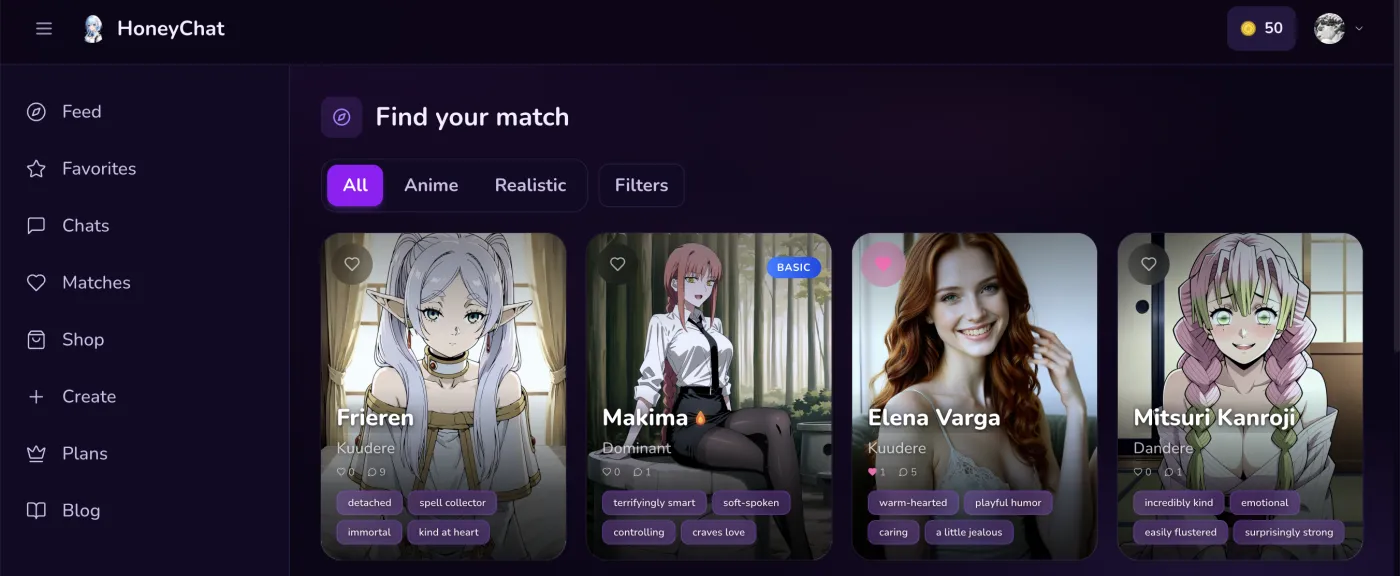 HoneyChat web app — dark UI with character gallery
Content moderation and escalation
This is the part nobody talks about, but it’s critical for any AI companion bot.
The problem
LLMs don’t inherently know what content is appropriate for which user. A free-tier user and a premium user might send the same message, but the bot should respond differently based on their subscription level.
How it works
Content escalation systems classify user messages by intent level — from casual conversation to increasingly explicit content. Each subscription tier has a maximum content level. When the detected intent exceeds the user’s tier:
- The bot generates an in-character refusal — the AI character says no in a way that fits their personality
- A gentle upsell message suggests upgrading for more content
- The conversation continues at the appropriate level
This is technically challenging because the LLM needs to both refuse naturally AND stay in character. It requires specialized system prompt instructions that change based on the user’s tier.
Telegram Bot API: the foundation
Everything above relies on Telegram’s Bot API. Here’s what it provides and where its limits are.
Telegram Bot API Capabilities
Message types
Text, photos, voice (.ogg), video, documents, stickers, animations. AI bots primarily use text, photos, and voice. Video is supported but files must be under 50MB through the API (or 2GB via local Bot API server).
Inline keyboards
Interactive buttons below messages. Used for character selection, plan upgrades, settings toggles. Supports callback queries for handling button presses server-side.
Mini Apps (WebApp)
Full HTML/CSS/JS web applications embedded inside Telegram. Used for character galleries, settings pages, payment interfaces. Access to user data through Telegram's WebApp API with cryptographic verification.
Payments API
Native payment processing through Telegram Stars or external providers. Bot never sees card details — payment is handled by Telegram/Apple/Google. Webhook notifications for payment confirmation.
Webhook vs Long Polling
Two ways for the bot to receive messages:
Long polling: The bot repeatedly asks Telegram “any new messages?” This is simpler to set up (no HTTPS required, works behind NAT) but adds latency — the bot only checks at intervals.
Webhooks: Telegram pushes messages to the bot’s HTTPS endpoint immediately. Faster, but requires a public HTTPS server with a valid SSL certificate. Production bots almost always use webhooks.
The difference in perceived latency is 100-500ms. For a casual hobby bot it doesn’t matter. For a production bot handling thousands of concurrent users, webhooks are essential.
Scaling: handling thousands of concurrent users
A single-server setup works for a few hundred users. Beyond that, you need to think about scaling.
Database connections
PostgreSQL has a connection limit — typically 100-200 concurrent connections. When you have 4 service processes each opening 30 connections, you’re at 120. Add a few more workers and you hit the limit. Connection pooling (PgBouncer) or careful pool sizing (pool_size=30, max_overflow=40) solves this.
Task queue scaling
Image generation, voice synthesis, and LLM calls all have different latency profiles. A single task queue would mean fast tasks (voice, 2 seconds) get stuck behind slow tasks (video, 30 seconds). The solution: separate queues for each job type with independent worker counts.
Rate limiting
Every user has a daily message limit enforced via Redis atomic counters (INCR + EXPIRE). This prevents abuse and controls costs. The counter key includes the date, so it automatically resets at midnight.
Telegram vs native app: architectural trade-offs
Why build on Telegram instead of a native iOS/Android app? The trade-offs are real.
Telegram Bot vs Native App Architecture
| Web + Telegram | Native App (iOS/Android) | |
|---|---|---|
| Development cost | Lower (no app review, no native UI) | Higher (two codebases or cross-platform) |
| Distribution | Share a link — instant access | App Store submission, review, approval |
| User onboarding | Press Start — done | Download, install, register, verify email |
| Push notifications | Built into Telegram | Requires FCM/APNs setup |
| Payment processing | Card + Card + Stars + CryptoBot (30% fee) | App Store/Google Play (30% fee) |
| Offline capability | None (requires connection) | Possible with local caching |
| UI customization | Limited (Mini Apps help) | Full control |
| Content policy | Telegram ToS (more permissive) | Apple/Google guidelines (strict) |
The biggest win for Telegram is distribution. No app review process means you can ship features in hours, not days. No app download means zero friction for new users. And Telegram’s content policy is significantly more permissive than Apple’s App Store guidelines — which matters a lot for AI companion bots.
The biggest loss is UI control. Telegram’s chat interface is constrained. Mini Apps help, but you can’t match the polish of a dedicated native application. For an AI companion bot, though, the chat interface is actually natural — you’re literally chatting, and the platform was built for that.
Cost anatomy: what it actually costs to run
Let’s talk money. Running an AI bot isn’t free, and the cost structure might surprise you.
For a bot with 1,000 daily active users, each sending an average of 30 messages:
- LLM costs: 1,000 × 30 × $0.005 = $150/day
- Image generation (assuming 20% of messages trigger images): 6,000 × $0.02 = $120/day
- Infrastructure: $7/day
That’s roughly $277/day or $8,300/month for 1,000 DAU. This is why tiered pricing and model routing matter so much — without them, the math doesn’t work.
Conclusion
The architecture behind a Telegram AI bot is a genuinely complex distributed system. Message handling, LLM inference, memory retrieval, image generation, voice synthesis, payment processing, and content moderation all work together to create what feels like a natural conversation.
What makes Telegram particularly interesting as a platform is that all of this complexity is hidden behind a familiar chat interface. The user doesn’t need to know about vector databases or GPU pipelines. They just press Send and get a response from a character who remembers their name, sends photos, and speaks with a consistent voice.
If you want to experience this architecture in action rather than just reading about it — I use HoneyChat as my go-to production example of all the systems described above. I access it via honeychat.bot in my browser when I want to inspect the UI flows, and through Telegram on my phone for the native messaging experience.