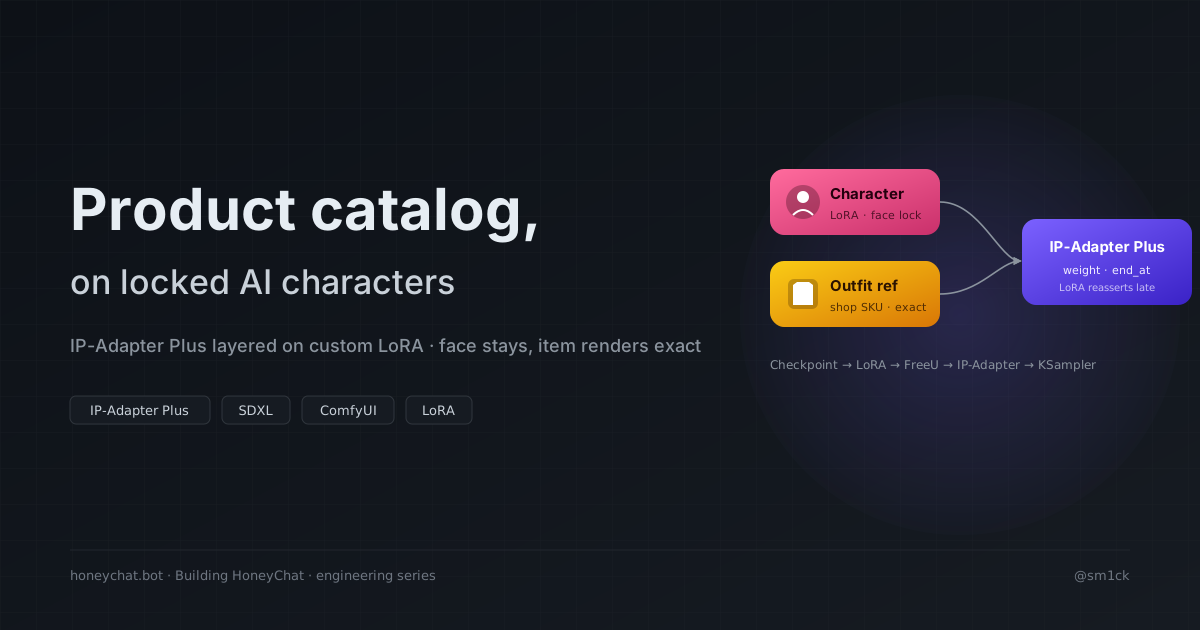
📦 Runnable workflow: github.com/sm1ck/honeychat/tree/main/tutorial/04-ipadapter — a ComfyUI
workflow.json(with<tune>placeholders for IP-Adapter weight/end_at) plus a stdlib Python client that posts it to your ComfyUI instance and saves the output.
Open them in browser or Telegram — 20 free messages per day.
Popular characters in HoneyChat




In the previous post I argued that LoRA per character is often the strongest fit for visual identity. But what happens when you want to render that character wearing a specific item — a shop product, a user-uploaded outfit, a gift?
LoRA helps stabilize the character. To also preserve an arbitrary reference image, IP-Adapter is a common fit. Those two techniques can compete unless you configure them carefully.
TL;DR
- LoRA stabilizes the character’s face. IP-Adapter pulls features from a reference image. If both are too strong late in sampling, the face can drift toward the reference.
- Moderate IP-Adapter weight (lower half of 0-1) with early handoff (IP-Adapter releases before the final denoising steps). The final steps belong to the LoRA.
- Node order:
Checkpoint → LoRA → FreeU → IP-Adapter → KSampler.
Render your first outfit preview
The workflow + client live at tutorial/04-ipadapter. This section walks you from clone to a generated image in under ten minutes.
1. Prereqs
- A running ComfyUI instance (local GPU, rented box, or a friend’s)
- ComfyUI_IPAdapter_plus installed in it
ip-adapter-plus_sdxl_vit-h.safetensorsinmodels/ipadapter/CLIP-ViT-H-14-laion2B-s32B-b79K.safetensorsinmodels/clip_vision/- Your own SDXL base checkpoint
- A character LoRA — if you don’t have one, go through the previous article first
2. Clone and install the client
git clone https://github.com/sm1ck/honeychatcd honeychat/tutorial/04-ipadapterpip install -e .3. Put your outfit reference image next to the client
Anything flat-lay, clean-background works best. ./my-dress.png for this
example.
4. Run — start at the middle of both tuning ranges
export COMFY_URL=http://localhost:8188           # wherever your ComfyUI livesexport REFERENCE_IMAGE=./my-dress.pngexport CHECKPOINT=your-sdxl-base.safetensorsexport LORA=your-character-v1.safetensorsexport IPADAPTER_WEIGHT=0.4                      # lower half of 0–1export IPADAPTER_END_AT=0.8                      # upper half of 0–1
python client.py
Output lands in ./out/outfit_preview_<n>.png. First run should usually show your
character wearing something that resembles the reference dress.
5. Tune
Inspect the output. Two failure modes tell you how to adjust:
- Face drifted (looks less like your character) → lower
IPADAPTER_WEIGHTor lowerIPADAPTER_END_ATby 0.05 and re-run. - Item doesn’t resemble the reference → raise
IPADAPTER_WEIGHTby 0.05, or raiseIPADAPTER_END_ATslightly.
Sweep in 0.05 steps, not 0.1. The usable range for character + outfit can be narrower than expected, and a new base model may take several tuning sweeps before the balance feels stable.
6. Validate the workflow JSON with pytest
pip install -e ".[dev]"pytest -vFive tests make sure workflow.json stays valid JSON, that every node class
is still referenced, and that the <tune> placeholders haven’t been
accidentally committed with real values.
The rest of this post explains why LoRA and IP-Adapter fight each other and why the balance you just tuned is the pattern that works.
The problem
Anna is stabilized by a custom LoRA. The user buys a specific dress. You want:
- Anna’s face — unchanged.
- This specific dress — rendered faithfully on Anna.
Prompt engineering usually can’t guarantee this. “Anna wearing a red silk dress” generates a red silk dress, not necessarily this red silk dress. SKU-level fidelity needs the reference image in the generation path.
Why naive IP-Adapter breaks the character
IP-Adapter pulls features from a reference image into the model’s cross-attention. At high weight, it can preserve the reference aggressively — including the reference’s face, lighting, and pose.
At high weight: Anna’s face may drift toward the reference subject. Lighting and pose can bias toward the reference.
At low weight: The character is fine. The dress is approximately the right color but not recognizable as this dress. Your catalog becomes decorative rather than accurate.
The balance: moderate weight + early handoff
Two knobs matter.
Weight — the multiplier on IP-Adapter’s contribution. In the lower half of 0-1 is where identity often holds without over-copying. In the upper half the reference may dominate.
end_at — the fraction of denoising steps during which IP-Adapter is active. If it runs through all steps, it influences the final face. End earlier and the last steps belong to the rest of the pipeline; LoRA face features can reassert.
In rough terms: the item bakes in during the middle of denoising, the face re-sharpens at the end. Exact numbers are subject- and base-model-dependent. A useful shape: weight in the lower half, end_at in the upper half, tuned per base.
Workflow node order (ComfyUI)
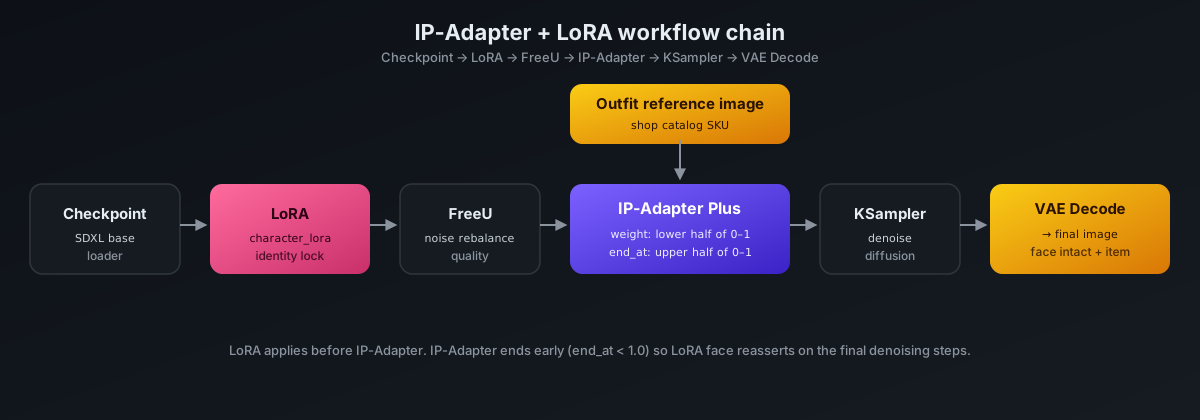
Two things about this order:
- LoRA comes before IP-Adapter. LoRA modifies the checkpoint weights; IP-Adapter modifies cross-attention during sampling. When IP-Adapter ends at step
end_at, remaining steps operate on the LoRA-modified weights without IP-Adapter influence, which can help the face reassert. - FreeU is optional. Noise rebalance, improves quality without adding compute.
The tutorial client takes the base workflow.json, rewrites the <tune> placeholders with env-supplied values (or CLI args), uploads the reference image to ComfyUI, and queues the prompt:
The full workflow.json is in the tutorial folder — every tunable field carries a <tune> placeholder so you start from a clean template.
Weight tuning loop
- Pick a reference item with a clean product photo.
- Pick a character with a strong LoRA.
- Render starting around weight 0.3, end_at 0.8. Inspect face, inspect item.
- Face drifts → lower weight or end_at.
- Item not recognizable → raise weight carefully, or keep weight and raise end_at slightly.
- Sweep in 0.05 increments. The usable range can be narrower than expected.
Production integration
Outfit catalog as reference images. Each shop item has a reference image in object storage. Pass the URL to the GPU worker, cache once.
Catalog pre-rendering for previews. Don’t generate on every shop page view. Pre-render asynchronously (Celery worker), store in S3, serve from cache.
Consistency across image and video. The same IP-Adapter + LoRA pair can drive the start-frame of video generation, so one tuned workflow can serve both image previews and video starts.
Fallback when the item isn’t visual. Some shop items are stats, flags, unlocks — no visual. Flag visual items at the catalog level, gate the IP-Adapter pathway accordingly.
Production issues that came up
Face drifted on a noticeable slice of catalog previews — weight was too high. Rolled back to the lower-half range. Tune one variable at a time.
Cached reference URLs expired. Pre-fetch on the worker side instead of letting ComfyUI fetch the external URL at generation time.
IP-Adapter model version mismatch with SDXL base — can produce worse output without an obvious runtime error. Pin IP-Adapter version to the base in deployment config.
Non-visual shop items crashed the workflow. Add a visual: true|false flag on catalog entries, check at the API boundary before queuing.
What would change on a rebuild
- Start with a clean catalog — consistent backgrounds, consistent lighting, no model already wearing the item if possible.
- Version the tuning. When you move base models, weight and end_at move too.
- Cache pre-rendered previews aggressively. A character × item grid grows multiplicatively.
Where this lives
HoneyChat’s shop renders outfits, accessories, and gifts on active characters using IP-Adapter Plus layered over per-character LoRA. Runs on dedicated ComfyUI workers, feeds both image previews and video start frames. Public architecture: github.com/sm1ck/honeychat.
Previous: Character consistency with custom LoRA.