📦 Full runnable example: github.com/sm1ck/honeychat/tree/main/tutorial/01-memory — clone,
docker compose up, chat with the demo bot on Telegram. Every code snippet below is a live pull from that repo; if you change code there, this article updates on the next build.
Open them in browser or Telegram — 20 free messages per day.
Popular characters in HoneyChat




Most AI chatbots still struggle with reliable, queryable long-term recall. Character.AI has pinned and chat memories, but unpinned details can still fall out of the active conversation context. Replika remembers profile facts, preferences, and generated memories, but that is not the same as semantic recall over the full conversation. Even ChatGPT’s Memory is built for useful preferences and details, not verbatim replay of long sessions.
HoneyChat was built for practical persistent memory — not just the current conversation, but older facts and events surfaced when they matter. Here’s the architecture that worked well for this use case.
TL;DR
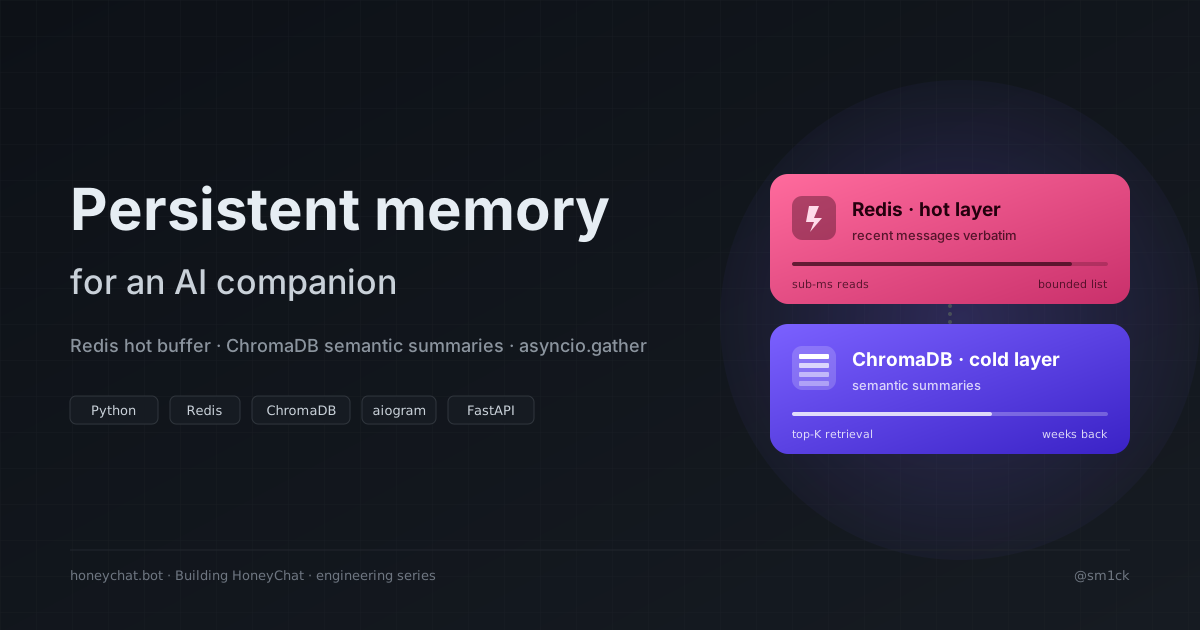
- Hot layer (Redis) — recent messages per conversation, short TTL, low-latency reads.
- Cold layer (ChromaDB) holds summaries of chunks, not individual messages. Every N bot turns, a background task summarizes that window via a cheap LLM and stores the summary as a document.
- On every user message, three retrieval paths fire in parallel via
asyncio.gather: recent buffer, latest summary, top-K semantic search. All three get assembled into the system prompt. - Result: substantially fewer tokens than full-history replay, while still making old context retrievable weeks later.
Run it yourself in 5 minutes
Before the architectural deep-dive, get the demo running so you can poke the memory layers live. Everything below happens inside tutorial/01-memory.
1. Clone and enter the folder
git clone https://github.com/sm1ck/honeychatcd honeychat/tutorial/01-memory2. Configure two tokens
cp .env.example .envOpen .env and fill:
TELEGRAM_BOT_TOKEN— get it from @BotFather (30 seconds:/newbot, pick a name, copy the token)OPENROUTER_API_KEY— from openrouter.ai/keys. The defaultLLM_MODELis a free-tier Llama 3.1 8B so you don’t spend a cent.
3. Start the stack
docker compose up --build -ddocker compose logs -f bot # watch the bot come aliveFour containers come up: redis, chromadb, api (FastAPI inspector on
localhost:8000), and bot (your Telegram bot polling).
4. Talk to your bot
Open the bot in Telegram (whichever name you gave it), hit /start, then chat
for 10–20 turns. Tell it things about yourself. Change subjects. Come back
later in the day and reference something you said earlier — it’ll pull it
from ChromaDB.
5. Peek at what each layer holds
# Replace 12345 with your own Telegram user ID (find it by messaging @userinfobot)curl http://localhost:8000/memory/12345/demo/recent | jqcurl http://localhost:8000/memory/12345/demo/summary | jqrecent shows the raw Redis buffer. summary shows the latest ChromaDB
document. After ~10 turns the summary appears — that’s the background writer
compressing old context.
Clear everything if you want a fresh start:
curl -X POST http://localhost:8000/memory/12345/demo/clearWith the demo running, the rest of this post explains what you just booted — what each piece does and why.
Why rolling summaries alone aren’t enough
A common pattern — every N messages, regenerate a compressed version of older context — is lossy in a specific way: nuance dies in repeated compression.
Turn 1: "She said she hates her boss because he takes credit for her work"Turn 2 summary: "User mentioned workplace frustration with manager"Turn 3 summary: "User has job-related stress"Turn 4 summary: "User has a job"By turn 4, the reason is gone. A companion bot starts sounding generic. The fix: keep raw recent messages verbatim and only summarize chunks that are genuinely old, while being able to semantically retrieve any summary from the full history when the current conversation calls back.
Architecture
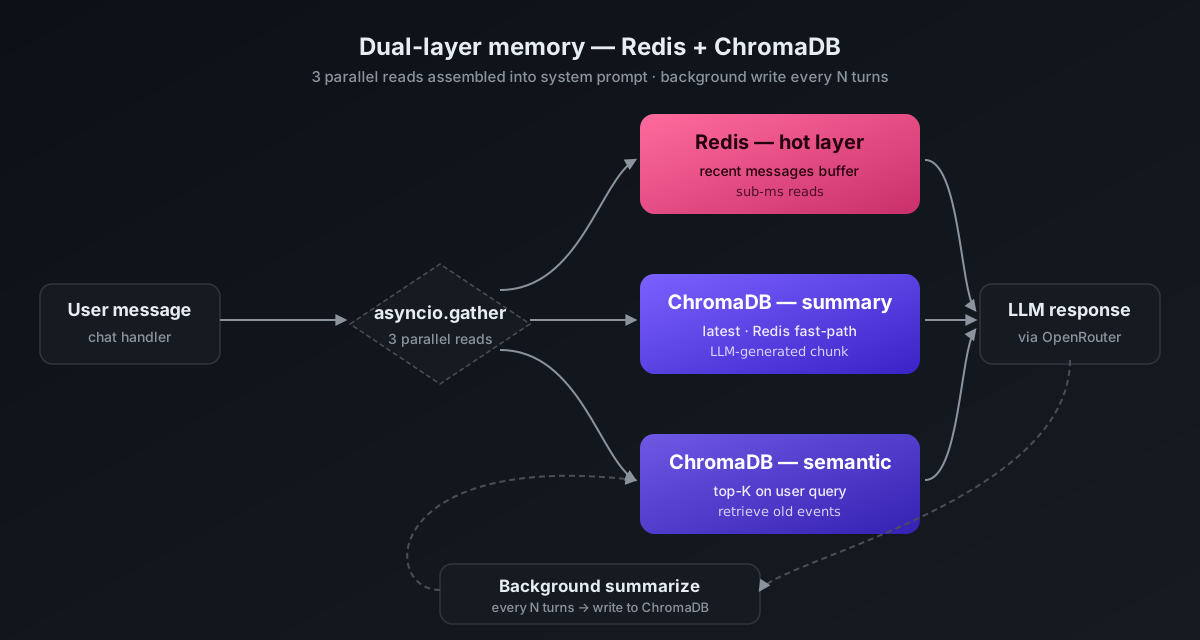
Two independent layers. Writes to Redis are synchronous on every turn; writes to ChromaDB are asynchronous, batched every N turns. Reads from both happen in parallel on every message.
The hot layer — Redis
Each (user_id, character_id) conversation is stored as a bounded Redis list:
Three things matter here:
ltrimon every write. The list is bounded. Memory per user is O(1).- TTL extended on every write. Inactive users’ history evicts automatically. Configure Redis
allkeys-lruso overflow evicts instead of refusing writes. - Pipelined writes.
rpush + ltrim + expirein one round trip.
When the LLM needs context, return a tier-capped slice — lower tiers see a short window, higher tiers see more. The exact numbers are a product decision.
The cold layer — ChromaDB with summaries, not messages
A tempting implementation is to embed every message and run semantic search over them. Two problems: the index grows linearly with conversation volume (slow queries, big storage), and individual messages are often too short or context-free to retrieve meaningfully.
Instead: embed LLM-generated summaries of chunks.
async def auto_summarize(user_id: int, char_id: int): r = get_redis() key = f"chat:{user_id}:{char_id}:messages" if not await r.exists(key): return msgs = await get_chat_history(user_id, char_id, limit=N) if len(msgs) < MIN_MSGS_FOR_SUMMARY: return summary = await summarize_history(msgs) if not summary: return # don't cache empty on LLM rate-limit if not await r.exists(key): return # user cleared mid-call — bail await save_memory_summary(user_id, char_id, summary)The summary captures the arc of the chunk — emotional state, key facts — not verbatim text. Each summary is one document in a per-(user, character) ChromaDB collection. Ten weeks of active conversation is maybe 30–50 documents per collection, not tens of thousands.
Retrieval — three paths in parallel
On every user message, three reads fire in parallel — this is the single most important function in the tutorial:
The fast path for the summary hits Redis. The slow path queries ChromaDB only when the Redis cache expired, then writes back.
Production issues that came up
Double-summarize race. Two concurrent messages for the same pair both trigger summarization, writing overlapping summaries. Fix: per-key task tracking, cancel the pending task if a new one fires.
User clears history mid-summarize. Re-check r.exists(key) before writing the summary.
Empty summaries cached. Guard if summary: before setex.
ChromaDB collection doesn’t exist for new users. col.query raises; wrap in try/except and return empty.
What would change on a rebuild
- For this workload shape, ChromaDB worked better than pgvector on short-query recall.
- Don’t embed per message by default — the index grows quickly, and recall may not improve.
- Summarize fixed-size windows, not time-based batches.
- Build cancellation pattern from day 1.
Where this lives
This architecture powers both honeychat.bot (web app) and @HoneyChatAIBot on Telegram. The public reference is in the engineering docs on GitHub — service topology, memory tables, and major flows.
Next in the series: LLM routing per tier via OpenRouter.