
A friend texted me last week: “Where do I download the Joyland AI app?” Short answer: there isn’t one. Joyland is web-only at joyland.ai — no Android APK, no iOS IPA, no Google Play listing. The “joyland ai download” search query gets ~90 monthly searches in EN, “joyland ai app” gets ~70, and “is joyland ai safe” gets ~110 — combined that’s ~270 monthly searches from people expecting an app that doesn’t exist. Here’s the actual install flow, the safety considerations, and what to use if you wanted a no-install Telegram-native experience.
Quick honest pitch upfront: most people who search “joyland ai app” really want “easy AI chat access without messing with browser tabs.” HoneyChat runs as @HoneyChatAIBot on Telegram (you already have Telegram, so no install) and at honeychat.bot in browser. Free 20 messages/day with voice, photo, memory included. $4.99/mo Basic flat — no credits system like Joyland Standard’s 5000/mo cap. Voice in 15 languages with Inworld TTS-1.5 Max. Detailed Joyland install guide below.
HoneyChat in Telegram — no APK, no PWA, just open the bot




How to “download” Joyland AI (spoiler: you don’t)
Joyland is web-only at joyland.ai. The install flow:
Open joyland.ai in any modern browser
Safari, Chrome, Firefox, Edge — all work. Mobile or desktop. No platform restriction.
Sign up — email or social OAuth
Email + password, or Google / Discord one-click. No phone number required. Age confirmation prompt appears (Joyland has 'Intimate Themes Access' on both paid tiers).
(Optional) Install as PWA for home-screen icon
iPhone Safari: tap share icon → 'Add to Home Screen' → confirm. Android Chrome: tap menu (3 dots) → 'Install app' → confirm. Creates an icon that opens Joyland in full-screen browser mode.
Browse the catalog or create a bot
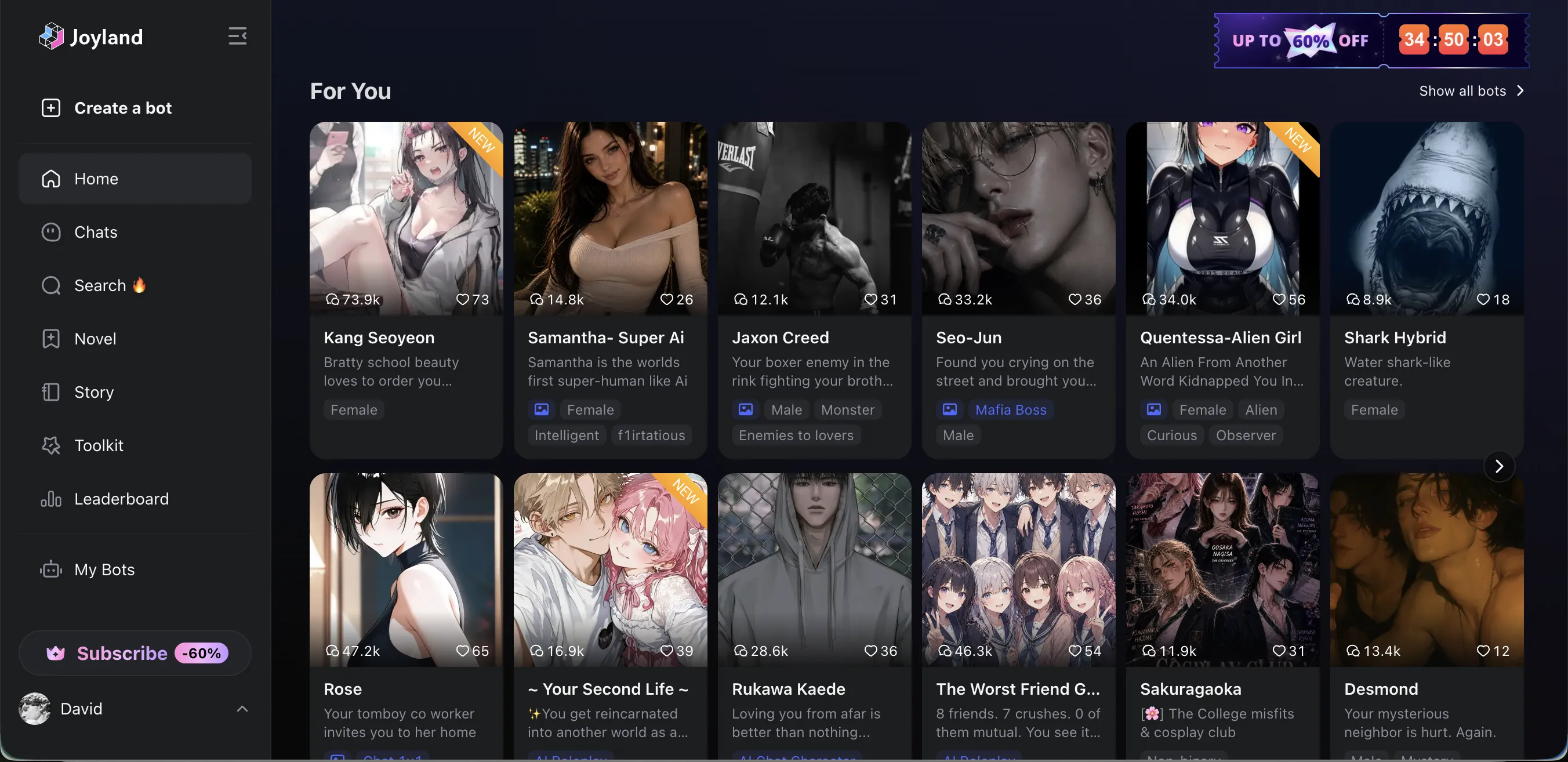
Sidebar has: Home (For You feed), Chats (your conversations), Search 🔥, Novel (book-length narrative), Story (scenario-based), Toolkit (character creation utilities), Leaderboard, My Bots, Create a bot button.
Free tier vs paid
Free tier is limited (specific quotas vary). Standard tier gets 5000 credits/mo + intimate themes + ad-free. Premium is no credit limits. Both tiers ad-free.
What you’ll see on the homepage:
Why there’s no native Joyland app
Joyland’s web-only design isn’t an accident. Several reasons platforms in the AI character chat space go web-first:
App store policy risk
Apple and Google have aggressive content moderation for NSFW-tolerant AI chat apps. Talkie was pulled from Google Play in April-May 2026. Joyland's intimate themes content makes app-store distribution risky.
30% platform tax
Apple and Google take 30% of in-app purchases. Web-based subscriptions through Stripe (etc) avoid this — keeping more revenue with Joyland.
Faster iteration
Web releases ship immediately; app updates wait for store review. For a startup iterating fast on features (Joyland's Toolkit, Leaderboard, Novel modes are clearly in active development), web is more flexible.
Cross-platform single codebase
One web app works on phone, tablet, desktop. No separate Android / iOS / desktop versions to maintain. Smaller engineering team, faster shipping.
For users, this means: Joyland will keep being web-only for the foreseeable future. There’s no roadmap announcement of a native app. If you want a native mobile app experience for AI character chat, look at Polybuzz (Google Play) or Talkie (just re-listed on Google Play).
Is Joyland AI safe?
The “is joyland ai safe” search query (~110/month) usually means one of three things:
1. “Is the website safe to visit?”
Yes. joyland.ai is a real product. Standard HTTPS, no malware redirects, no phishing patterns, no doorway-page redirects to other domains (unlike some shady AI chat sites — see Cuties AI red flags review for what those look like).
2. “Is my account data safe?”
Standard SaaS practices. No published security audit. Joyland stores account credentials, chat history, generated images, and payment metadata. Privacy policy is reasonable but not exceptional. Compare to platforms with stricter data policies if privacy is a high concern.
What I’d recommend regardless of platform:
- Use a unique password (not reused from other accounts)
- Don’t use your primary email if you want a privacy layer (create a dedicated one)
- Don’t share real-world identifying details in chats you don’t want associated with you
- Check the privacy policy before paying
3. “Is the NSFW content age-appropriate?”
Joyland requires age confirmation for “Intimate Themes Access.” Both Standard and Premium include intimate themes. The catalog is community-created, so quality and tone vary widely. Like all AI character platforms with NSFW-tolerance, Joyland has a server-side filter that handles edge cases, but the filter isn’t transparent and can change without notice.
If documented NSFW levels matter to you, HoneyChat’s 6-level (0-5) switchable system per character is the cleanest in this category.
Avoid: “Joyland AI mod APK” — this is fake malware
Because Joyland has no real app, any “Joyland Mod APK,” “Joyland Premium Free APK,” or “Joyland Unlimited Credits APK” you find online is fake. Common patterns:
- Torrent sites — APK contains random Android malware (adware, crypto miner, credential stealer) wrapped in fake Joyland branding
- Telegram “free apps” channels — same payload, different distribution
- YouTube tutorials — usually link to phishing pages that steal credentials when you “log in”
- Fake review sites — affiliate-spam pages that link to APK downloaders
There’s nothing for a real mod to unlock — Joyland subscription checks happen server-side, same as every modern SaaS. Even if a mod APK could install, it couldn’t activate Premium features.
If you specifically want to use Joyland on Android with an app-like experience, install joyland.ai as a PWA (steps above). That’s the only legitimate path.
Joyland vs alternatives — install comparison
Install experience: Joyland vs alternatives
| Joyland | Polybuzz | Talkie | HoneyChat | |
|---|---|---|---|---|
| Native Android app | No | Yes (Google Play) | Yes (Google Play, re-listed May 2026) | No (Telegram is the install) |
| Native iOS app | No | Yes (App Store) | Yes (App Store) | No (Telegram is the install) |
| PWA support | Yes (basic) | Stripped web only | Yes | N/A (Telegram + web) |
| Web version full-featured | Yes | No (stripped) | Yes (post-takedown fallback) | Yes (synced with Telegram) |
| Install size | 0 (web) | ~96 MB APK | ~100 MB | 0 (Telegram already installed) |
| App store takedown risk | Not applicable | Low (survived so far) | Demonstrated April-May 2026 | Not applicable |
| Cross-device sync | Server-side, automatic | Server-side, app + web | Server-side, app + web | Real-time Telegram + web |
| Free tier usable on first visit | Yes, after signup | Yes, with ad-paywall | Yes, with ad-paywall | Yes (20 msg/day, no signup) |
Which install path fits your use case
Want native mobile app: Polybuzz (most reviews on Play) or Talkie (recently re-listed). Both work as standalone Android/iOS apps. Trade-off: app store takedown risk (proven for Talkie), 30% Apple/Google tax on subscriptions.
Want web-only no install: Joyland (joyland.ai) or HoneyChat (honeychat.bot). Joyland is more feature-rich on web than Polybuzz’s stripped web version. HoneyChat is feature-complete on web and synced with Telegram.
Want zero-friction (no signup, no install, no email): HoneyChat via Telegram (@HoneyChatAIBot). You already have Telegram if you’re reading this on most demographics. Open the bot, start chatting. 20 free messages/day with voice, photo, memory.
Want PWA bookmark on home screen: Joyland PWA install works. Functionally identical to using the website, just adds an icon.
Pros
- No download required — open in any browser
- Works on phone, tablet, desktop (cross-platform)
- No app store takedown risk
- Faster feature iteration (no app store review delays)
- PWA install option for home-screen icon
- Desktop experience is genuinely good (vs Polybuzz stripped web)
Cons
- No native mobile app (some users prefer the app feel)
- No push notifications (mobile)
- No offline mode
- Requires browser tab open during chat
Pros
- No APK, no IPA, no PWA install needed
- Telegram is the install (~99% of target demo already has it)
- Browser-native sync at honeychat.bot
- Free 20 msg/day with full features (no signup)
- $4.99/mo Basic flat (no credits, no per-action billing)
- No app store takedown risk (no app)
- Voice in 15 languages (Inworld TTS-1.5 Max)
Cons
- 80+ catalog vs Joyland community thousands
- No specific franchise characters
- Smaller community
- Video on tier limits (Basic 2/mo, Elite 16/mo)
Bottom line
Joyland AI download searches expect an app that doesn’t exist. Joyland is web-only at joyland.ai — by design, not an oversight. You can install it as a PWA for a home-screen icon if you want app-like access, but functionally it’s still a browser experience.
The platform is safe in the standard sense (real product, no malware, standard SaaS data practices) but uses aggressive ‘90% OFF’ marketing UX you should ignore. Don’t let the perpetual countdown timer rush a subscription decision.
If you wanted a true zero-install AI chat experience (no PWA, no signup, no APK), HoneyChat on Telegram (@HoneyChatAIBot) + browser (honeychat.bot) is the cleanest fit. Free 20 msg/day, no email, voice in 15 languages. Smaller catalog is the trade-off.
Related: Joyland AI review — Standard vs Premium, Personas, Joyland AI alternatives — similar chats, Polybuzz download safe guide, Talkie AI banned / Google Play fix.