A friend texted me last week: “Polybuzz download — should I get it from Google Play or somewhere else?” Fair question. The answer’s mostly “just use Google Play” but there are enough edge cases (PC users, App Store region issues, people who want sideload) that it’s worth walking through. I went through every install path myself across one Android phone, one iPhone, and a Windows desktop. Here’s what worked, what’s pointless, and one option that doesn’t require installing anything at all.
Quick honest pitch before the long version: if the reason you’re searching this is “I want to try Polybuzz before committing,” there’s a faster path — open it in your browser. HoneyChat runs at honeychat.bot and as @HoneyChatAIBot on Telegram. No APK, no emulator, no Google account, 20 free messages/day with voice/photo/memory included. Switchable 6-level NSFW (0-5), LoRA-trained character art, and the voice (Inworld TTS-1.5 Max, a high-quality neural TTS engine) actually does 15 languages natively, not just English-with-accents like Polybuzz. The detailed Polybuzz install paths are below.
If you want to see what kind of characters live on the no-install alternative:
Characters in HoneyChat — open in browser, no download




Polybuzz on Google Play (Android — the main path)
This is what 99% of Polybuzz users do. The app is published as Polybuzz: Chat with AI Friends under package id ai.socialapps.speakmaster. Direct link:
play.google.com/store/apps/details?id=ai.socialapps.speakmaster
Stats from the listing as of May 2026:
Tap Install, wait ~90 seconds on Wi-Fi, done. No VPN required for the download — and despite some old guides claiming Polybuzz is geo-blocked from Russia or other regions, it’s actually live in most Google Play markets right now. The 988K review count includes a sizable Russian-language segment.
What occasionally trips people up: the Google account region setting (not your IP, not your VPN). If your account is set to “Country: Armenia” but you’re physically in the US, Google Play will still show “this app is unavailable in your region” because the account says Armenia and Polybuzz isn’t published in Armenia’s catalog. Fix: Account → Payments and subscriptions → Settings → Country → set correctly.
Polybuzz on iPhone (App Store)
App Store search: “Polybuzz: Chat with Characters.” iOS 13+ required. ~100 MB. Sign in with Apple ID, same as Android.
The one annoyance: if your Apple ID is a region where Polybuzz isn’t in the App Store, you either change your region (which requires re-doing your payment method) or you don’t get the iOS app. There’s no official IPA distribution outside the App Store.
People do search for “polybuzz IPA” hoping for a sideloadable file — third-party IPA libraries (AppDB, BuildStore) sometimes have community-uploaded versions, but those are unsigned and need AltStore or a $99/year Apple Developer account to install. Not worth the hassle. If App Store access is the blocker, the cleanest path is to use polybuzz.ai in mobile Safari or switch to a service that doesn’t require an app at all.
Polybuzz on PC (Mac/Windows)
There’s no native desktop client. Three workarounds:
polybuzz.ai web version
Browser-based, runs on any OS. Stripped of voice, shorter chat history, more frequent 'Take a Little Break' ad modal than the apps. Free to start, no install.
BlueStacks (Android emulator)
Most popular. Install BlueStacks → install Polybuzz APK inside it. Works but eats 4–8 GB of RAM and adds noticeable latency on voice and image generation. Free.
LDPlayer (lighter emulator)
Less resource-heavy than BlueStacks but voice input gets glitchy. Works for text chat. Free.
NoxPlayer (cross-platform)
Best for Mac users who want a single emulator that works on macOS and Windows. Same APK install flow as BlueStacks. Free.
Honestly, the emulator path is the kind of thing you do once, regret, and then go back to mobile. If desktop matters to you and you’re not married to Polybuzz’s specific catalog, look at AI chat platforms that were built web-first — HoneyChat at honeychat.bot has voice, photo, memory, all features that work natively in any browser without a 4 GB emulator running in the background.
What you’ll actually see in the app — homepage walkthrough
Once installed, the home screen looks like this:
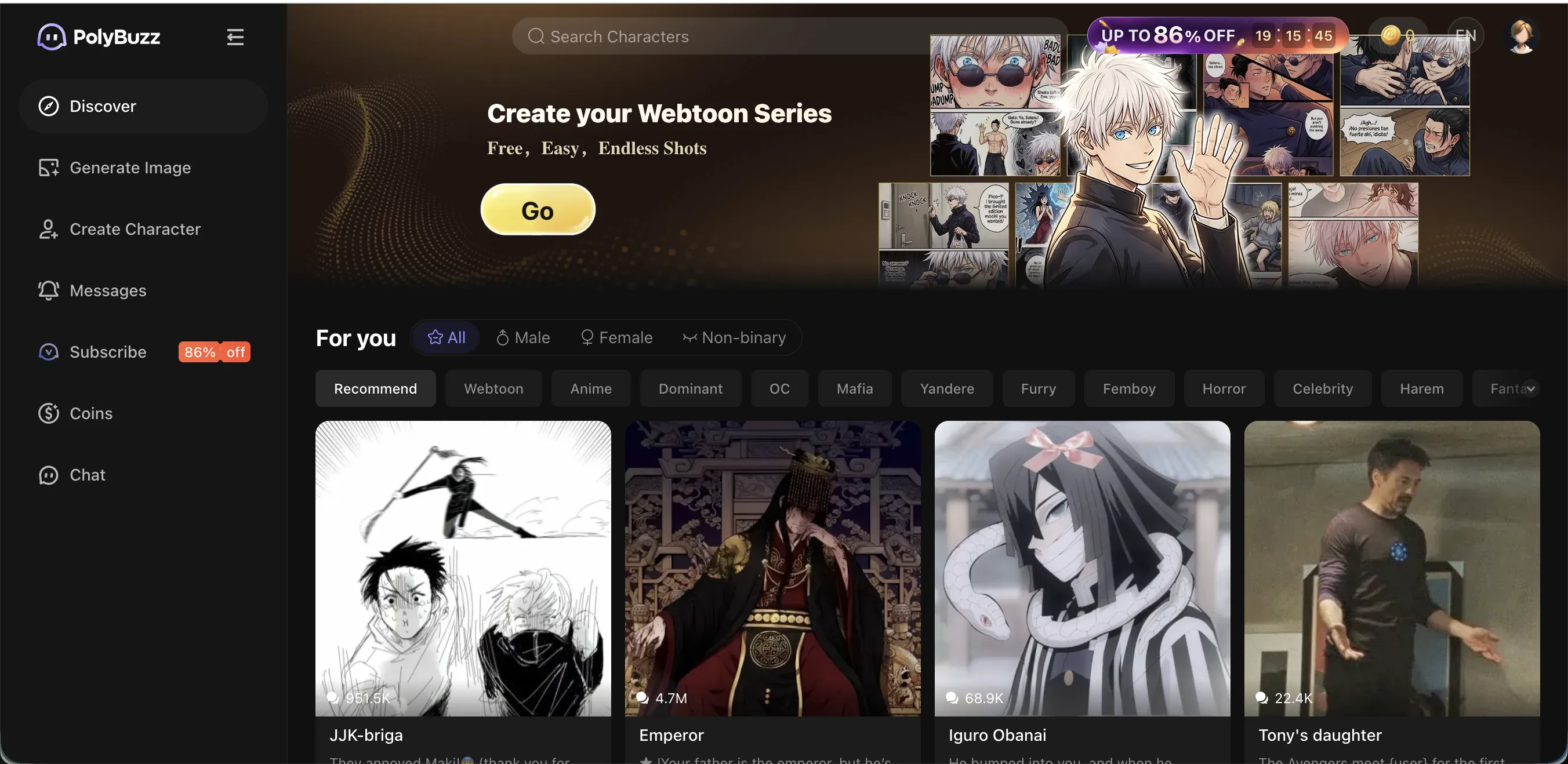
The left sidebar has the main navigation: Discover (catalog), Generate Image, Create Character, Messages, Subscribe (the always-discounted button), Coins, and Chat. The horizontal filter strip across the top — Webtoon, Anime, Dominant, DC, Mafia, Yandere, Furry, Femboy, Horror, Celebrity, Harem, Yuri — is how you navigate the 20M+ catalog.
The “UP TO 86% OFF” timer in the upper right is permanent. It resets when it hits zero. Standard app monetization pattern, but worth knowing it’s not actually a limited offer.
Sideloading APKs (Android — when Google Play won’t work)
If Google Play shows “unavailable in your region” and you can’t fix the account region setting, sideloading is the workaround:
Choose a trusted APK source
APKPure (apkpure.net) or Trashbox (trashbox.ru) only. Both moderate uploads. APKPure ships latest version 3–7 days ahead of Google Play. Avoid torrent sites entirely.
Enable 'Install from unknown sources'
Settings → Apps → Special access → Install unknown apps → enable for the browser or file manager you'll use to open the APK.
Download and tap to install
The Polybuzz APK is around 96 MB. Tap, accept permissions, install. Disable 'unknown sources' afterward — leaving it on is a security risk.
Sign in normally
Sideloaded APK works the same as Google Play install. Email or Google sign-in, browse the catalog, start chatting.
Manual updates
Google Play won't auto-update sideloaded APKs. Check APKPure monthly for new versions, or set up its automatic update feature in their app.
⚠️ Mod APKs are different from sideload APKs. Sideload = same APK from a trusted mirror. Mod APK = modified APK from a torrent or sketchy Telegram channel claiming “premium unlocked.” The mod APKs don’t work — Polybuzz checks subscription status server-side, not in the local APK. About 60% of mod APKs contain ad SDKs (you watch ads that pay the modder), 25% contain credential stealers, 10% run crypto miners in background. Detailed breakdown: see why Polybuzz mod APKs don’t work.
Polybuzz install paths — comparison
All Polybuzz install options compared
| Google Play | App Store | Sideload APK | Emulator (PC) | Web (polybuzz.ai) | HoneyChat (no install) | |
|---|---|---|---|---|---|---|
| Platform | Android | iOS | Android | Win/Mac | Any browser | TG + browser |
| Install size | 96 MB | ~100 MB | 96 MB | 4–8 GB (emulator) | 0 | 0 |
| Voice support | Yes (Basic+) | Yes (Basic+) | Yes (Basic+) | Yes (Basic+) | No | Yes (free, 15 langs) |
| Auto-updates | Yes | Yes | No | Yes (in emulator) | Always latest | Always latest |
| Ad-break frequency | Standard | Standard | Standard | Standard | Higher | None |
| Account region issues | Can occur | Can occur | Workaround | Workaround | None | None |
| Free tier usable | No (ad-break) | No (ad-break) | No (ad-break) | No (ad-break) | No (ad-break) | Yes (20/day) |
The pattern’s pretty clear: every Polybuzz path eventually hits the same monetization gate. The web is just a worse version of the apps. The emulator is just a heavier version of the apps. Sideloaded APKs are still gated by the server. The only actually-different option is to use a different platform.
When you should NOT install Polybuzz
A few honest scenarios where downloading Polybuzz is a waste of disk space:
- You’re on the free tier and you message more than ~20 times per session. The “Take a Little Break” ads will kick in. You’ll uninstall within a week.
- You can’t easily get a foreign Visa/MC/Amex card. Polybuzz subscriptions are charged via Visa/Mastercard/Amex/Diners Club or Apple/Google Pay (currency depends on your country — USD for US, EUR for EU, etc.). If your bank’s card doesn’t work on their payment processor (e.g., RU/India in some cases), the paid tiers are unreachable. No SBP, Mir, UPI, PIX, or other regional methods.
- You want voice in a language other than English. Polybuzz voice playback is English-only. Your Russian/Spanish/Japanese text gets read with English phonemes — sounds wrong.
- You need persistent memory across long arcs. Only Ultimate ($29.9/mo) keeps full chat history. Free/Basic/Premium prune after a context window fills up.
- You want to run it on PC properly. Emulators are a kludge. Web is stripped.
In any of those cases, install isn’t the bottleneck — the platform is. The honest move is to test a different platform.
What I use when I don’t want to install another app
I keep coming back to HoneyChat for the same reason: it’s friction-free.
- Open Telegram → start chatting with @HoneyChatAIBot. No install of anything new (you already have Telegram), no email, no password.
- Or open honeychat.bot in any browser. Same chat, same characters, same memory — synced across both.
- Free tier: 20 messages/day with voice, photo, memory, and full character roster. No ads, no “Take a Little Break.”
- Paid tiers flat: $4.99 Basic / $9.99 Premium / $19.99 VIP / $39.99 Elite. Each tier includes everything in it (no Dreamcoins, no per-action billing).
- Voice: Inworld TTS-1.5 Max, 15 languages natively — Russian sounds like Russian, Japanese like Japanese.
- Image consistency: every character has a LoRA (small AI model trained on that character’s art), so faces don’t drift the way they do in generic Stable Diffusion catalogs.
It’s not a Polybuzz killer on catalog size — 100+ characters vs 20M+ is not a fair fight. But on every other axis (free tier, voice, payment, ad experience) it’s the cleaner option for most people.
Bottom line
Polybuzz install is straightforward on mobile (Google Play / App Store), workable on PC (emulator or stripped web), and a security risk if you go through torrent or “modded” APK channels. The 988K Google Play reviews back up that the official app is real and stable — the controversy is all about the in-app monetization, not the install itself.
If you’re going to use Polybuzz, install from the official store. If the install friction (size, account region, no PC client) is what made you search this, the no-install alternative on Telegram and browser solves all of it without giving up much except catalog volume.
Related: Polybuzz review — pricing, censorship, alternatives, is Polybuzz down — fix guide, Polybuzz mod APK / premium free truth, Polybuzz uncensored — what’s possible.