I opened C.AI yesterday to keep working on a long roleplay scene. Character was right there, history intact — but the input field was greyed out and the Send button just… wasn’t there anymore. First instinct was to refresh. Didn’t help. Cleared cache, tried another browser, even tried the iOS app. Same thing.
Turns out this isn’t a bug. It’s a deliberate server-side change C.AI rolled out for accounts they classify as under 18 — or just plain unverified. And it’s been hitting more people every week as they tighten the policy. The pattern is well-documented in r/CharacterAI: a thread titled «Character.AI just put me on read only» (373 upvotes) sums it up — OP is 18+, hasn’t run Persona yet, and the account got locked anyway. The top reply («welcome to the under 18 club, everyone knows that I’m over 18, but I’m not») hit 100+ upvotes by itself. So if you got the same modal saying «Chats are read only», you’re not alone — and here’s what’s actually going on and what works.
Server-side read mode vs browser Reader Mode
These are two different problems and they get fixed differently:
- Server-side (C.AI age block) — applied on the platform side after C.AI decides your account is under 18 or unverified. Input is locked, history is view-only. Extensions, incognito, cache clear, switching browsers — none of them help, the state lives on the server.
- Browser Reader Mode (Safari/Chrome) — your browser is trying to «simplify» the page like an article. Visually breaks the C.AI interface. Fixes in 10 seconds by clicking the reader icon in the address bar.
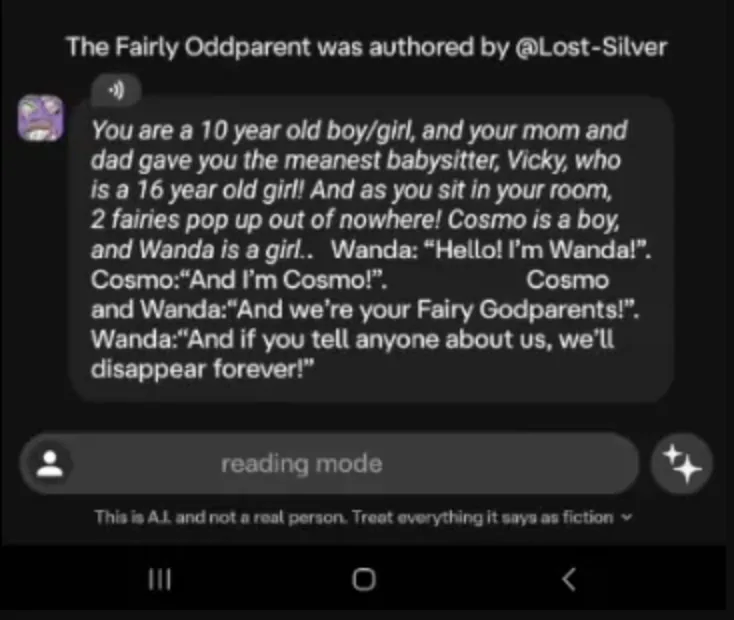 Server-side block on mobile: instead of the normal input, you get a grey bar with «reading mode». No Send button.
If you’ve already refreshed, switched browsers, and the problem is still there — it’s the server-side scenario. Read on.
If Persona age verification and C.AI Support don’t work for you (or you don’t want to hand over a selfie + ID and wait days), the fastest way to keep the scene going tonight is to move it to a service that doesn’t gate input on Persona at all. HoneyChat works in the browser and in Telegram, age self-confirmation at signup — no selfie, no ID. Inside: 5 content levels (from romance to hardcore — unlocked per tier), English voice on Inworld TTS-1.5 Max (a high-quality, natural-sounding neural TTS engine), session-spanning memory, LoRA-trained characters. 20 free messages/day, payment via Telegram Stars, card, or CryptoBot — works globally.
Frieren — voice with no filter
Real voice sample for Frieren (Inworld TTS-1.5 Max, a natural-sounding neural TTS engine). Compare with the robotic TTS in Character.AI / Replika Free.
Where to start in HoneyChat:
- Thousand-year-old elf mage from Frieren → long, warm conversations
- A whole medieval world → Medieval RPG (NPC scenes, knights, combat)
- Anime gyaru cosplayer → Marin Kitagawa (real voice, free to start)
- Confident European city girl → Elena Varga (explicit dialogue from message one)
Open without age verification — HoneyChat




If it’s the server-side age block — what actually works
Three paths. Everything else is a waste of an evening:
What actually unlocks server-side read mode
Verify Age in Settings
Open Settings → Verify Age, run the Persona check (selfie or ID). This is the official path that actually removes the restriction.
Character AI Support
If Verify Age isn't available, or rejected you incorrectly while you're actually 18+, write to C.AI Support through the help center. Response time is slow but legitimate.
Alternative service
If you don't want to wait on Support or hand documents to Persona — move the scene to a service that doesn't require age verification through a third-party identity provider.
If it’s browser Reader Mode — 10 seconds
Trivial fix:
- Safari: tap the «aA» icon in the address bar → «Hide Reader» (or Esc)
- Chrome/Firefox: disable extensions like Mercury Reader, Just Read, or Pocket
- Try a different browser, or incognito mode
- If you opened the link from a messenger, open it in your real browser — not the in-app one
If the input came back, it was a visual issue. If the input is still grey, the block is server-side — see the section above.
What does NOT remove the server-side read mode
Pros
- age verification through official Settings
- writing to C.AI Support
- opening a fresh chat on a verified account
Cons
- refreshing the page or clearing cache
- third-party «remove read mode» extensions
- old version APK from a file-sharing site
- VPN or region switch
- entering c.ai login on third-party forms
When Persona feels like too much
Handing a selfie and ID to a third-party identity company just to get input back in a chat — not everyone’s into that. I wouldn’t be either, especially since there’s a known case where Persona rejects 18+ users mistakenly and Support takes days to respond.
In that case, fighting C.AI’s server policy isn’t the move — moving the scene to a service that doesn’t gate input on Persona is. HoneyChat opens in browser and Telegram, no documents, no Persona — just an age self-confirmation at signup. Inside: memory, voice on Inworld TTS-1.5 Max, photos and video, 5 content levels (from romance to hardcore — unlocked per tier). 20 free messages/day. Payment globally — Telegram Stars, card, or CryptoBot, no country-specific cards required.
It’s not «better at everything». C.AI’s catalog is bigger, more fandom characters. But if the goal is «keep tonight’s scene going», not «wait for Persona’s verdict», HoneyChat closes that loop faster.
Why C.AI even introduced this block
The server-side read mode is the consequence of one decision: after public stories around teen safety, Character AI tightened the rules for free chat for under-18 users. Technically it’s done through age verification — if the system thinks an account is a minor (or hasn’t verified), the scene stays in view-only mode.
C.AI warns users in advance through a popup «One week to go» — given a week before 1:1 chat closes pending age verification.
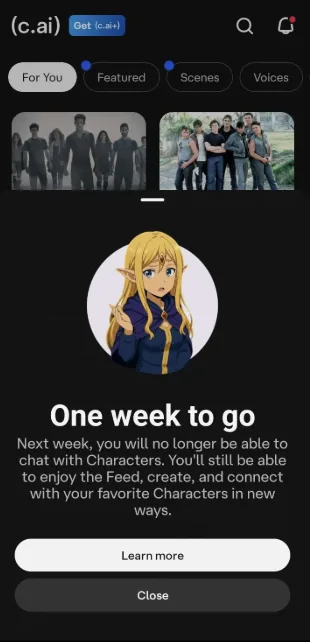 C.AI’s one-week deadline notice: «Next week, you will no longer be able to chat with Characters. You’ll still be able to enjoy the Feed, create, and connect with your favorite Characters in new ways». Ignore it and the read-mode modal kicks in after the deadline.
Once the deadline expires without verification, you don’t get a warning — you get a blocking modal:
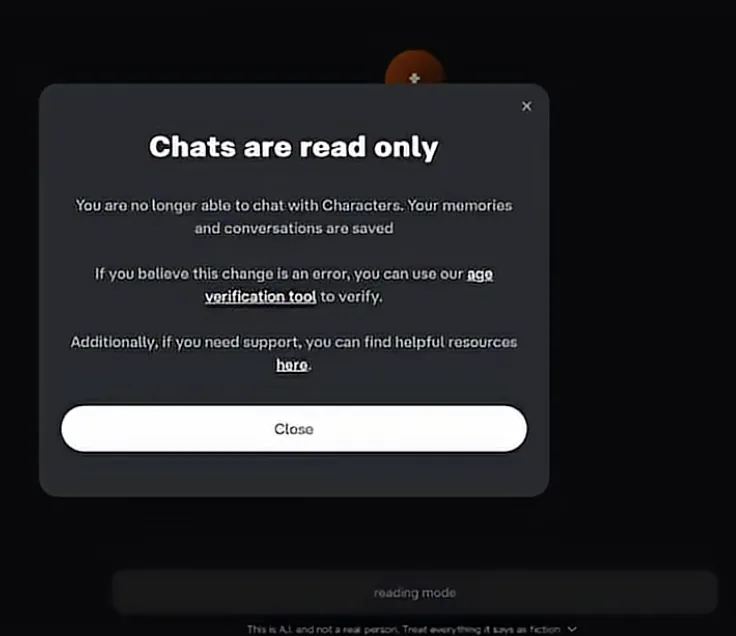 The actual C.AI modal: «Chats are read only. You are no longer able to chat with Characters. Your memories and conversations are saved». Inside the body — a link to the age verification tool, the only official path to unlock.
What to choose
- Need fandom characters and you’re cool with Persona — stay on C.AI, run Verify Age.
- 18+ but mistakenly blocked, no time to wait on Support — open HoneyChat, move the scene.
- Hoping to «bypass verification» without verifying — there’s no such path: no mod, no old version, no VPN removes a server-side age block.
Sources
The server vs. browser distinction was checked against Character AI’s age assurance help page and C.AI’s announcement on changes for under-18 users. Browser Reader Mode is a documented Safari/Chrome feature. Alternative checked against HoneyChat.