When the evening’s set up for a long scene and C.AI isn’t responding, it’s tempting to google «how to fix character ai» and land on advice that says clear your cache for a server-side problem. That’s a waste of an evening. First step is figuring out which «not working» you actually have.
The fact that there’s no single fix is well-visible across r/CharacterAI: each thread describes a different symptom. «Cai not working anymore — character won’t respond» — typing dots appear, then disappear; OP tried logout, cache clear, even a new account, nothing helps. «Chats not loading» — «Chat error! Tap to Refresh» banner, reinstall doesn’t help. «Site not loading on Chrome even after clearing cookies» — site freezes for 7+ minutes; OP eventually fixed it by opening any non-main page first. Three threads, three completely different root causes — exactly why a generic «clear your cache» reply is the wrong starting point.
HoneyChat is useful in this situation not as «replace C.AI forever», but as a Character.AI alternative without filters — a backup chat that’s available exactly when C.AI is down, in waiting room, or just locked your account in read-only. Inside: 5 content levels (from romance to hardcore — unlocked per tier), voice on Inworld TTS-1.5 Max, session-spanning memory, LoRA-trained characters, photo and video. Browser + Telegram — one subscription covers both. Free 20 messages/day, payment via Telegram Stars, card, or CryptoBot — works globally. Tonight’s scene continues now, not next week.
Where to start in HoneyChat:
- Thousand-year-old elf mage from Frieren → long, warm conversations
- Cold Makima from Chainsaw Man → real voice on every reply
- Anime isekai world → Isekai Fantasy (NPCs, lore, branching plot)
- Confident European city girl → Elena Varga (explicit dialogue from message one)
Works right now — open in HoneyChat




1. The site is genuinely down
Signs: same broken behavior across multiple devices, Twitter/Reddit complaints about «c.ai down», DownDetector showing spikes.
What to do: wait or work in something else. Nothing to actually fix here — the server isn’t on your side of the connection.
2. Waiting-room mode kicked in
Signs: chat loads normally, but responses take 30–90 seconds, sometimes a literal «please wait» message.
What to do: either wait it out (load drops off-peak) or pay c.ai+ ($9.99/month) — no waiting room is included in the subscription.
3. Your account got server-side read mode
Signs: chat opens, history is intact, but the input field is grey and the Send button is gone. Refreshing and switching browsers don’t help.
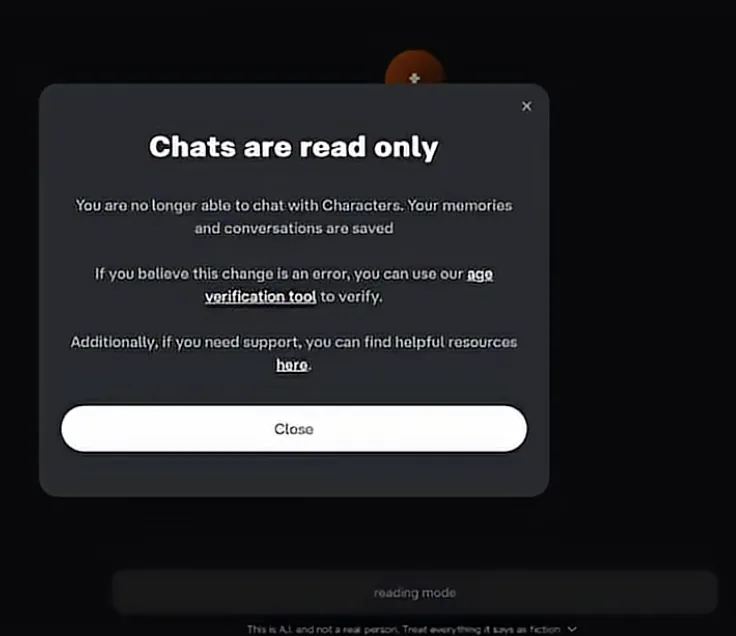 Real C.AI modal: «Chats are read only» — memory and conversations saved, but you can’t write. If 18+ got mistakenly rejected — there’s an age verification tool link inside.
This is a server-side age restriction. C.AI considers the account under 18 or unverified. Only fixes via official path:
- Settings → Verify Age → Persona check
- If 18+ got mistakenly rejected — Character AI Support
- No third path: mods, VPN, old APKs do not lift a server-side age block
4. Country-level access block (Cloudflare GeoIP)
Signs: site opens, you can browse /explore and characters, but /chat/<id> returns 403 or hangs on “Loading…” forever. Often happens for users in Russia, parts of Asia, and some EU corners after October 2024.
What happened: Character.AI added a Cloudflare GeoIP filter at the CDN layer after the Pennsylvania lawsuit and the Sewell Setzer III case (Wikipedia: Deaths linked to chatbots). It’s not a Roskomnadzor / national-level block — it’s the platform’s own legal-risk decision after a cluster of teen safety lawsuits drove down regional access to high-risk regions. The full timeline of regulatory events that drove this decision is in our AI companion regulation 2024-2026 reference.
What works:
- VPN with a US or EU exit node unblocks chat (but not payment — $9.99/mo c.ai+ still requires a foreign card; Stripe declined RU/CN cards since March 2024)
- WireGuard protocol is more stable than OpenVPN for c.ai’s CDN — fewer mid-session disconnects
- Mobile app on iOS/Android via VPN works the same as browser
What doesn’t help: clearing cache, switching browsers, signing out — none of these affect the GeoIP block, which is determined by your IP address only.
If you don’t want to deal with VPN every session, you need a service that’s GeoIP-friendly by default — HoneyChat works without VPN from any region, payment via Telegram Stars (any card), СБП, or CryptoBot.
5. Account banned (Age Verification fail or IP reputation)
Signs: after a successful registration via VPN, the account gets suspended within 1-7 days. Email from c.ai support reads “Your account has been suspended” with no specific reason.
Why this happens after VPN registration:
- Age Verification fail — Persona (the verification system) rejected your selfie or ID, often without explanation. C.AI tightened age verification after California SB 243 took effect January 2026
- VPN IP reputation — public VPNs (NordVPN, ExpressVPN, free proxies) are on c.ai’s anti-abuse blocklist. Better: paid private VPNs (Mullvad, ProtonVPN paid) with dedicated IP
- Cookie / fingerprint inconsistency — c.ai notices abrupt IP changes without logout, may flag the account as suspicious
What to do:
- C.AI support response time: 7-21 days, often template-only refusal. Recovery odds ~30%
- Creating a new account isn’t trivial — same email/phone fingerprint blocks re-registration. You’d need a fresh email, fresh phone number, fresh device fingerprint (private browser + new IP)
- Often simpler to pick an alternative. Character.AI is far from the only character-AI service — alternatives without verification gates are covered in our Character AI alternatives guide
6. Scene gets cut by the filter
Signs: character abruptly drops out of the role, replies «let’s change the topic», switches to a neutral formal tone when the scene gets adult.
This isn’t a bug — it’s content policy, and c.ai+ doesn’t lift it. If the filter is the actual issue, look at a platform with a configurable content policy instead of fighting server rules.
Quick diagnostic by symptom
Does the site open at all?
No — scenario 1 (outage), wait it out. Yes — continue.
Can you access /chat/<id>?
Returns 403 / hangs — scenario 4 (GeoIP block, need VPN). Loads — continue.
Does the chat respond?
Slow (30–90s) — waiting room (scenario 2). Not at all — go to step 4.
Is the input field active?
Greyed out — server-side read mode (scenario 3). Active — continue.
Account suspended after recent VPN signup?
Yes — scenario 5 (age/IP-reputation ban). Open support ticket but expect ~30% recovery.
Does the scene flow normally otherwise?
Cuts off on adult themes — scenario 6 (filter).
What to use as a backup chat right now
When C.AI is down or you’ve hit scenarios 3–4 (server policy), HoneyChat doesn’t try to «fix C.AI» — it gives you a parallel channel. Browser and Telegram, no Persona, no documents — age self-confirmation at signup. Inside: 5 content levels (from romance to hardcore — unlocked per tier), session-spanning memory, voice on Inworld TTS-1.5 Max, LoRA-trained characters. Free 20 messages/day, payment via Telegram Stars, card, or CryptoBot worldwide.
Old C.AI chats won’t import — that’s worth knowing upfront. But if the goal is «keep tonight’s mood going», not «recover the old history», a backup service closes that loop faster than waiting on the status page.
Wait on C.AI or move the scene
Pros
- works right now, doesn't depend on C.AI's status
- 6 content levels (0-5), hardcore unlocked on Elite
- age self-confirmation instead of Persona
- Telegram Stars / Card / CryptoBot worldwide
Cons
- C.AI history doesn't carry over
- fandom character catalog smaller
Bottom line
Match the symptom to the scenario, not to a generic «clear cache» fix. Scenarios 1–2 (outage, waiting room) — wait or pay c.ai+. Scenarios 3–4 (read mode, filter) — these are the platform’s policies, not bugs you can patch out. If you need tonight’s scene to keep moving regardless of which one hit you, open a backup chat in parallel.
Sources
Status patterns checked against DownDetector C.AI page and r/CharacterAI’s outage threads. Read-only and Verify Age specifics cross-checked with C.AI’s age assurance help and under-18 changes announcement. Backup tested via HoneyChat.