Character.AI’s age verification isn’t a one-time formality anymore. After public stories around teen safety, C.AI rebuilt their under-18 experience: free chat for those accounts is restricted, and a third-party identity provider (Persona) handles the age check itself. Server-side, the system flags «teen-looking» accounts and drops them into view-only mode — that’s the «read mode» you keep seeing posts about.
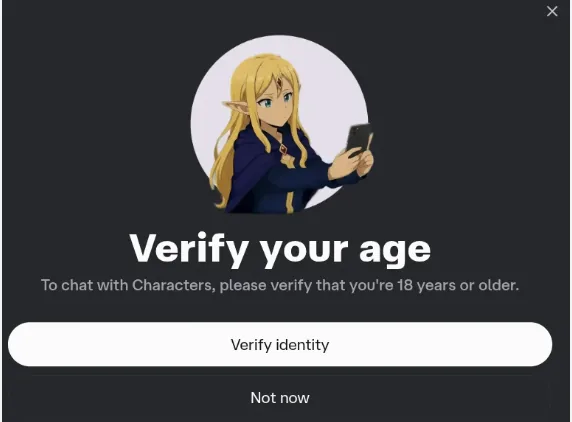 The starting C.AI modal: «To chat with Characters, please verify that you’re 18 years or older». You can defer with «Not now», but eventually the chat closes until verification.
HoneyChat doesn’t use Persona and doesn’t ask for documents — age confirmation is on the signup screen, after that you can write straight away. Inside: 5 content levels (from romance to hardcore — unlocked per tier), voice on Inworld TTS-1.5 Max (#1 in voice model rankings, 15 languages), session-spanning memory, LoRA-trained characters, photo and video. Browser + Telegram, payment via Telegram Stars, card, or CryptoBot — works globally. Free: 20 messages/day.
Where to start in HoneyChat:
- Explicit chat from message one → Seraphina Vale (20 free messages/day)
- Cold Makima from Chainsaw Man → real voice on every reply
- A whole medieval world → Medieval RPG (long scenes, NPCs, combat)
- Ex who remembers everything → picks up days later from where you left off
No Persona — open in HoneyChat




Step-by-step: passing the age check
Verify Age walkthrough
Open Settings → Verify Age
If the option isn't there yet, the rollout hasn't reached your account. Wait or write to Support.
Run the Persona check
Selfie via camera. Persona runs face-based age estimation. Good lighting, face fully in frame, no glasses or hat.
If selfie isn't enough — ID
In edge cases Persona requests a document (passport, driver's license). Uploaded through Persona's secure form, not C.AI directly.
Check your profile birthdate
Sometimes the issue is just the birthdate set at signup. If it's under 18 there, no Persona check helps — C.AI trusts its own data first.
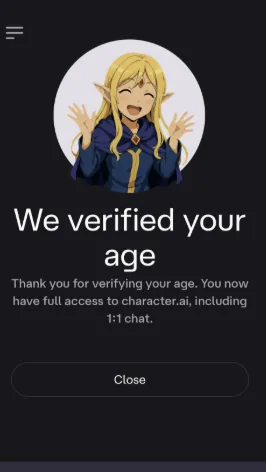 Successful verification: «You now have full access to character.ai, including 1:1 chat». 1:1 chat is exactly the input that was locked in read mode.
What to do if 18+ got mistakenly rejected
Persona occasionally misjudges — especially with younger-looking faces and bad lighting. The official path is C.AI Support through their help center: file a ticket, reference the mistaken rejection, attach a clear ID photo. Response time runs from a few days to two weeks.
What doesn’t work and adds risk: mods, «old APK versions», third-party «helper» sites, VPN, swapping account regions. Server-side age block only lifts through official paths; everything else either does nothing or steals your login.
Parental Insights — the grey path you’ll see discussed on forums
C.AI Settings has a separate section called Parental Insights — officially a feature for parents of teen users. The intended flow: a teen invites a parent by email, the parent gets weekly activity stats (chat content stays private), and the account moves into a supervised mode without the server-side input lock.
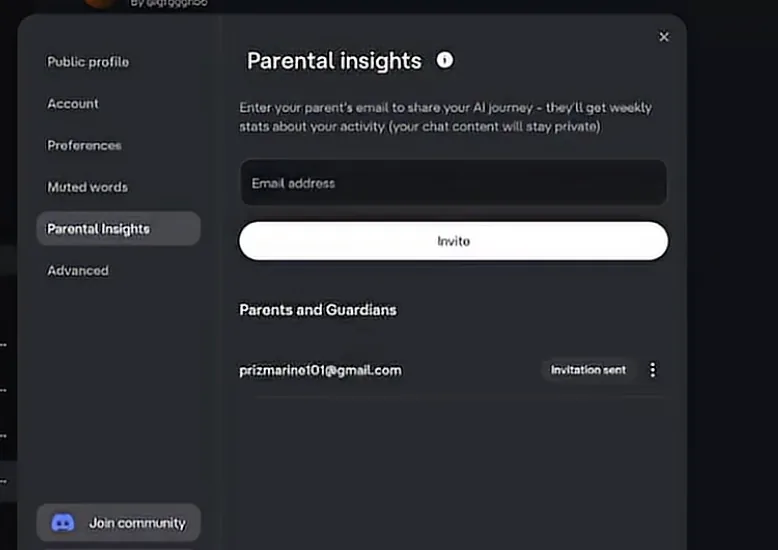 Settings → Parental Insights in C.AI: enter a «parent» email, see a Parents and Guardians list with «Invitation sent» status.
On forums, users discuss using this as an alternative to Persona: enter a second personal email or a partner’s email, that person accepts the invitation — and the account stops being «teen-locked». Technically this isn’t a Persona age check, it’s parental consent.
Why I wouldn’t recommend this as a primary path:
- C.AI explicitly frames this as a feature for parents of teens, not a bypass route. If the platform detects «parent» being a second email of the same user, the entire account can get suspended.
- You need a real second email + a real other person (or your alter-ego) willing to show up in Parents and Guardians.
- Adult content access stays «teen-tier» anyway: hardcore NSFW and an account without age verification are different things. The server-side adult-content filter on roleplay still applies.
If the goal is purely to unlock the input field (not get adult content on C.AI), Parental Insights sometimes works. If the goal is uncensored adult roleplay, this doesn’t solve it — moving to a service with age self-confirmation is faster.
Alternative without Persona and IDs
Handing a selfie + ID to a third-party identity company just to keep last night’s roleplay going is a psychologically heavy lift, especially if you’re 18+ and the goal is just chatting. The reluctance is widespread — in the «Character.AI just put me on read only» thread (373 upvotes), the highest-rated reply («People who say to just verify… Verify and let Persona be hijacked again?», 136 upvotes) lands precisely on this point: many users would rather skip the check than hand biometric data to a third party. For people who want to skip the personal-identity check, the practical alternative is a service with age self-confirmation.
HoneyChat works in browser and Telegram (one subscription covers both). Age confirmation is at signup, no selfie, no ID. Inside: 5 content levels (from romance to hardcore — unlocked per tier), session-spanning memory, voice on Inworld TTS-1.5 Max (#1 in voice rankings, 15 languages), LoRA-trained characters, photo and video. Free: 20 messages/day. Globally — Telegram Stars, card, or CryptoBot.
Verify Age vs alternative path
| Character AI | HoneyChat | |
|---|---|---|
| Age check | Persona: selfie + ID | self-confirm at signup |
| What you get after | C.AI baseline, content policy unchanged | 6 content levels (0-5) per tier, hardcore on Elite |
| Where to open | website + iOS/Android | browser + Telegram Mini App |
| Payment globally | card only | Telegram Stars / card / Crypto |
Bottom line
- Cool with Persona, want fandom characters specifically — run the official Verify Age.
- 18+, mistakenly rejected, no time to wait weeks on Support — file with Support AND in parallel move active scenes to a service without identity-check.
- Don’t want to hand a selfie/ID to a third-party — pick a platform with age self-confirmation and a clear content policy.
Sources cross-checked against Character AI’s under-18 policy announcement, the under-18 experience update, C.AI age assurance help page, and HoneyChat.
Why the age question won’t go away
AI companions got too personal for platforms to pretend age doesn’t matter. Character.AI publicly tightened rules for under-18 users: stricter experience, restricted free chat, age verification. Any «verify your age» prompt should be read as part of an overall policy, not a random page error.
If you’re an adult and the system got it wrong — annoying, but solvable through the official path. Not through mods or mirrors.
What not to do
Don’t send IDs to Telegram bots that «help verify age». Don’t enter your login on mirror sites. Don’t install APKs that promise to remove age verification. All of these look like a shortcut, but in practice they just add risk.
If you just want adult chat without the C.AI drama, easier to pick a service with clear rules and a clean signup. HoneyChat fits that — Telegram and browser, payment via Stars / Card / CryptoBot, no separate email, free trial available.
Sources
The age verification specifics were checked against C.AI’s help articles describing the verification rollout, Persona, and the Support escalation path for incorrectly verified accounts. Confirmed via Character AI age verification help.